Prepaid Packages & Credit Tracking
Give your clients the value of bulk-discounted lesson and training packages while building predictable, recurring revenue for your barn.
A Better Way to Manage Lesson and Training Commitments
Prepaid service packages are one of the most effective ways to strengthen your business. Clients pay up front for a set number of sessions, and your barn benefits from consistent, predictable revenue each billing cycle. Services are pre-paid, which protects your time and income, providing reliable, consistent upfront revenue that makes monthly cash flow planning more predictable. Packages also give you a natural way to enforce monthly lesson or training minimum requirements.
HayNet makes it easy to set up, sell, and manage prepaid packages without the manual tracking that turns a good business model into an administrative headache. Credits are assigned automatically when subscriptions renew, deducted automatically when clients book qualifying sessions, and visible to both you and your clients in real time. When a client's credits run out, their sessions are simply billed at the standard rate with no disruption to their schedule.
How Prepaid Packages Work
HayNet's prepaid packages follow a simple subscription-based cycle that keeps everything organized without any manual bookkeeping on your end.
- Create a Package Product — Define the number of credits, the token type (e.g., "Group Lesson," "Training," "Private Lesson" or a custom token type), the price, and an optional expiration period.
- Subscribe a client — Add the package to a client's subscription. When their subscription renews at the start of each billing cycle, HayNet automatically generates a fresh set of credits in their account.
- Client books a session — When the client books an event that accepts their token type and they have credits available, HayNet consumes a credit automatically.
- Invoice reflects the credit — Consumed credits appear on the client's invoice as a $0.00 line item, showing that a credit was applied as well as the event name, date, and time so there's no confusion.
No spreadsheets, no punchcards, no tallying in a log book or elsewhere, no more confusion about who used what and when. HayNet handles the entire lifecycle from purchase to consumption to renewal.
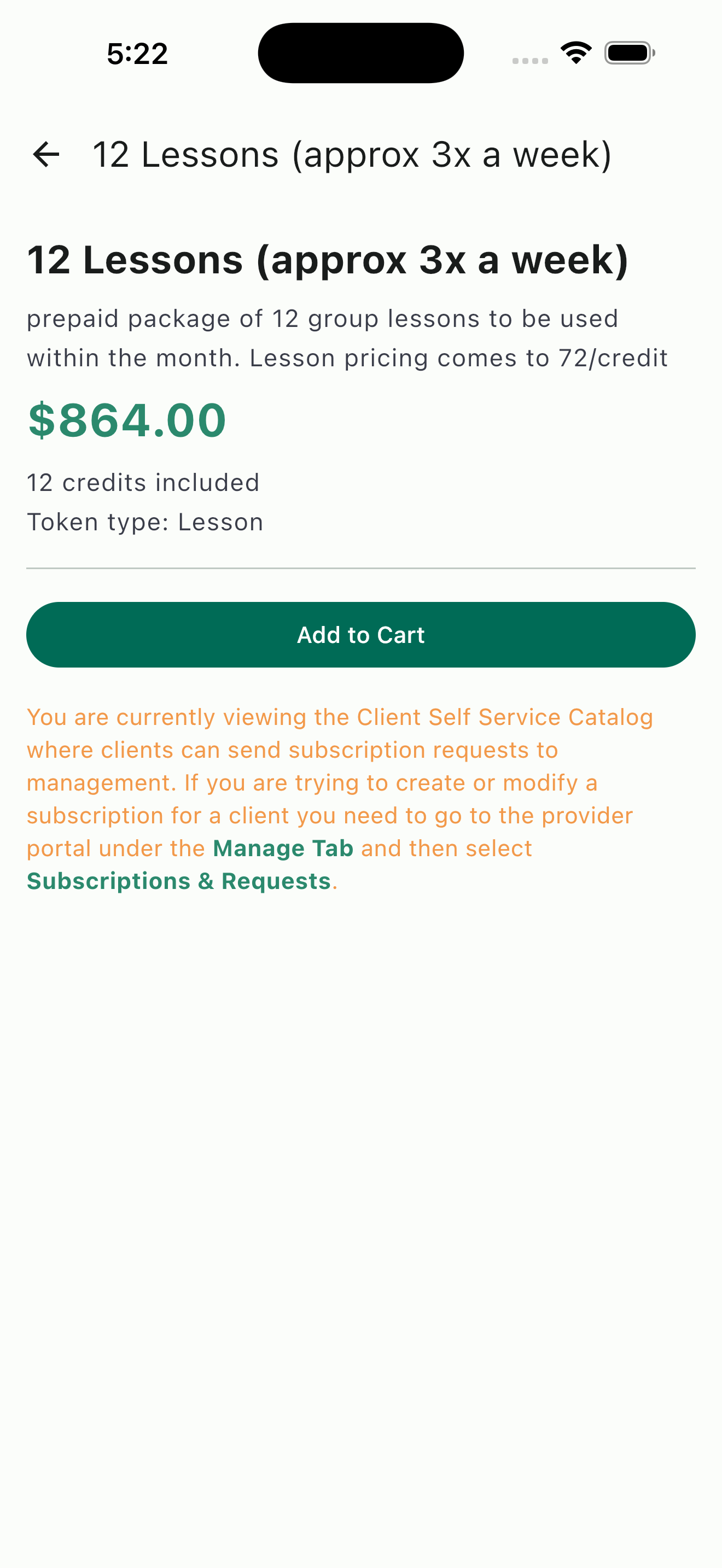
Package detail view: pricing, credit count, token type, and add-to-cart for client self-service
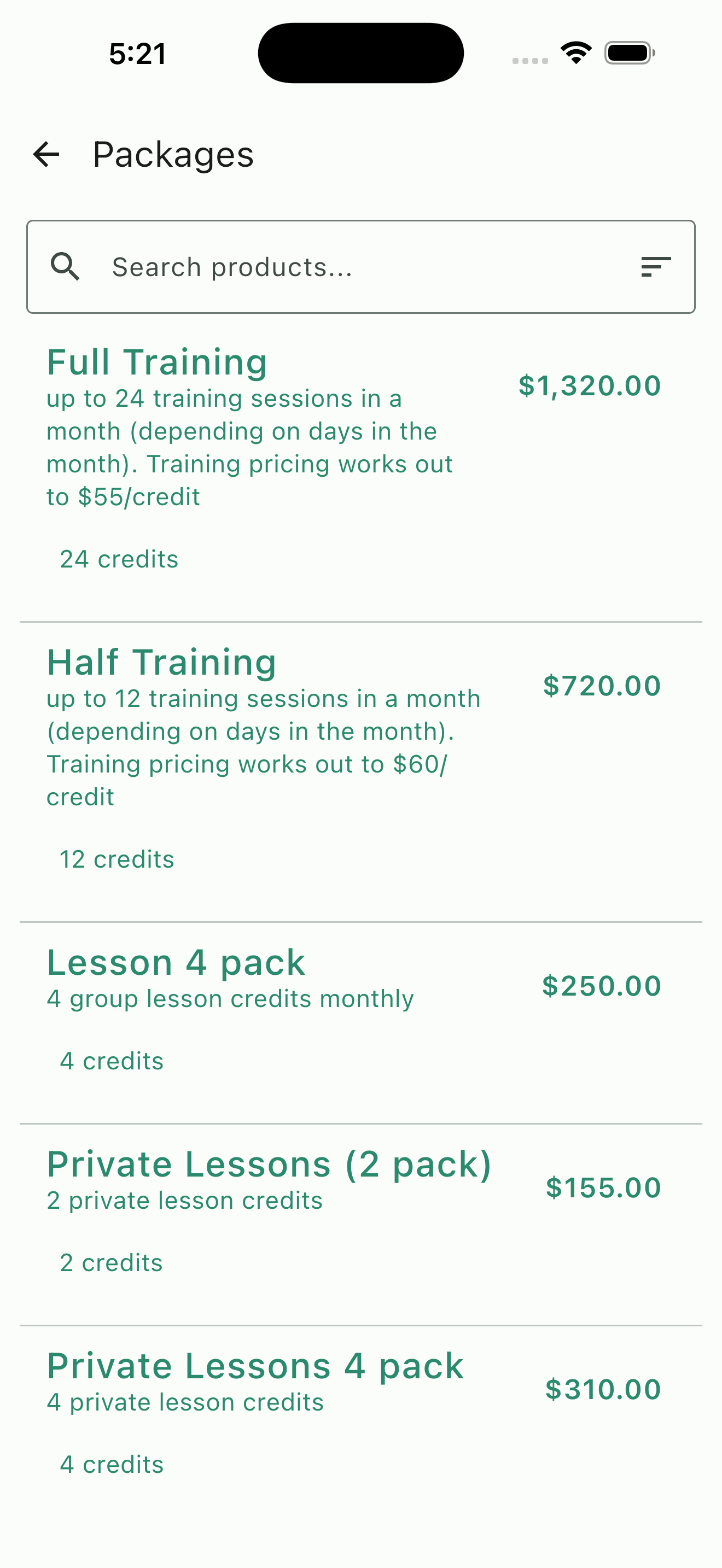
Packages catalog: training and lesson bundles with per-credit pricing
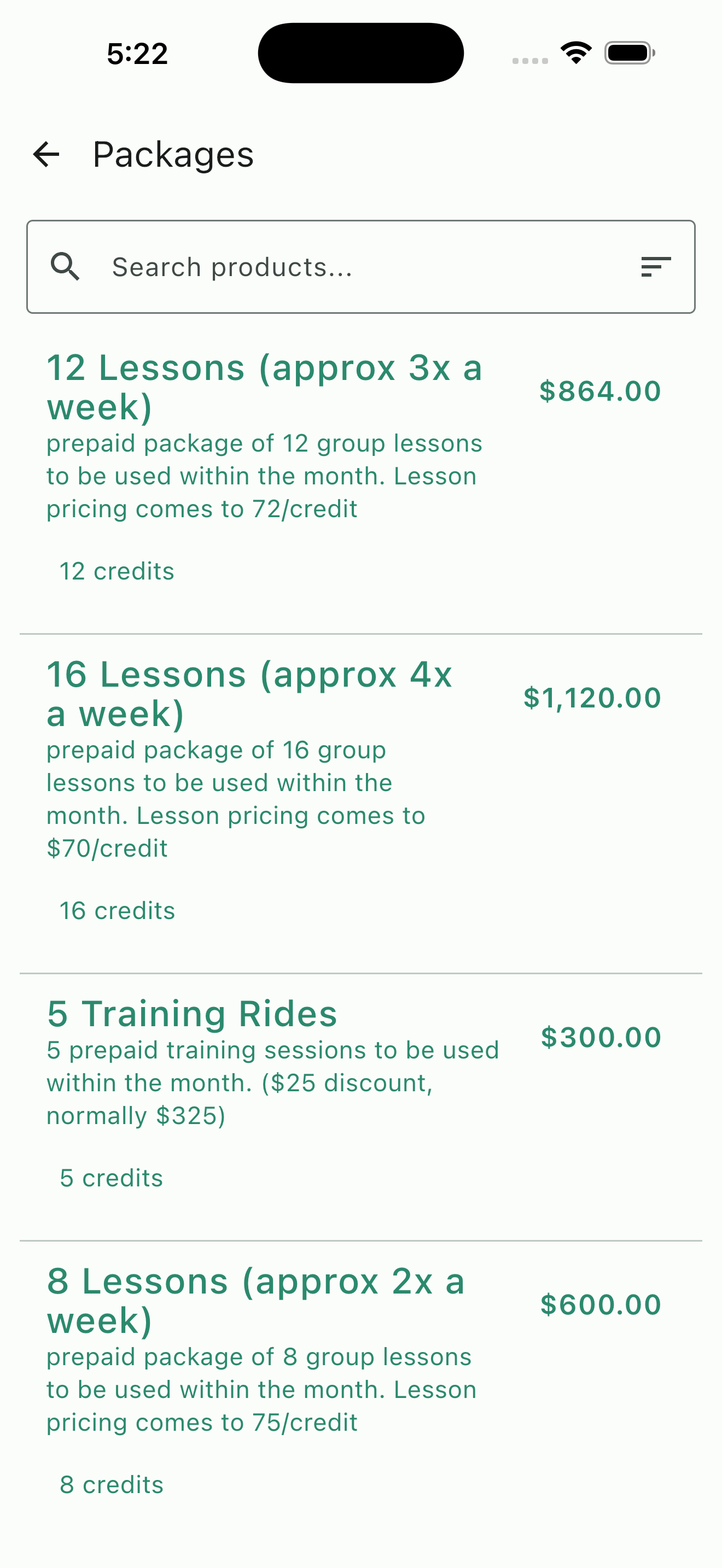
Packages catalog: higher-frequency bundles with optional volume discounts
Flexible Package Design
Every barn runs different programs with different price points, and your package offerings should reflect that. HayNet lets you create as many packages as you need to match the commitment levels your clients are looking for.
For example, offer a 4-pack for casual riders, an 8 or 12-pack for more dedicated riders, and a 16+ package for serious competitors or those with multiple horses. Packages are also useful for training packages at varying levels based on the number of days per week the horse will typically receive training rides. You also have the flexibility to set discounted pricing so that higher-commitment packages carry a better per-session rate to encourage clients to take more lessons or put more training on their horses, but the primary value is the predictable revenue and pre-payment — discounting is a tool, not a requirement.
Each package defines its own credit count, token type, price, and expiration window. You can adjust offerings any time as your programs evolve, whether you are adding another trainer at a different price point, introducing a seasonal special, or restructuring your pricing. Existing active subscriptions continue under their original terms until their next renewal, so there is no disruption to current clients when you make changes.
The Token System
At the core of HayNet's prepaid packages is a credit system built around token types. Token types let you categorize your credits by service so that the right packages apply to the right events automatically.
Create custom token types that match the services your barn offers such as Group Lesson, Private Lesson, Training Ride, Lunge, or anything else specific to your programs. When you configure an Event Product, you specify which token types it accepts as payment. An event can accept multiple token types, giving your clients flexibility. For example, your "Intermediate Group Lesson" event could accept Group Lesson tokens, Training tokens, and an "Any Lesson" catch-all type.
When a client books a session, HayNet checks whether the client has an available credit matching one of the accepted token types. If they do, the credit is consumed automatically. If the event accepts multiple types and the client holds more than one, the system uses the token expiring the soonest, first. The entire process is invisible to the client aside from seeing their credit's balance decrease, making the booking experience seamless.
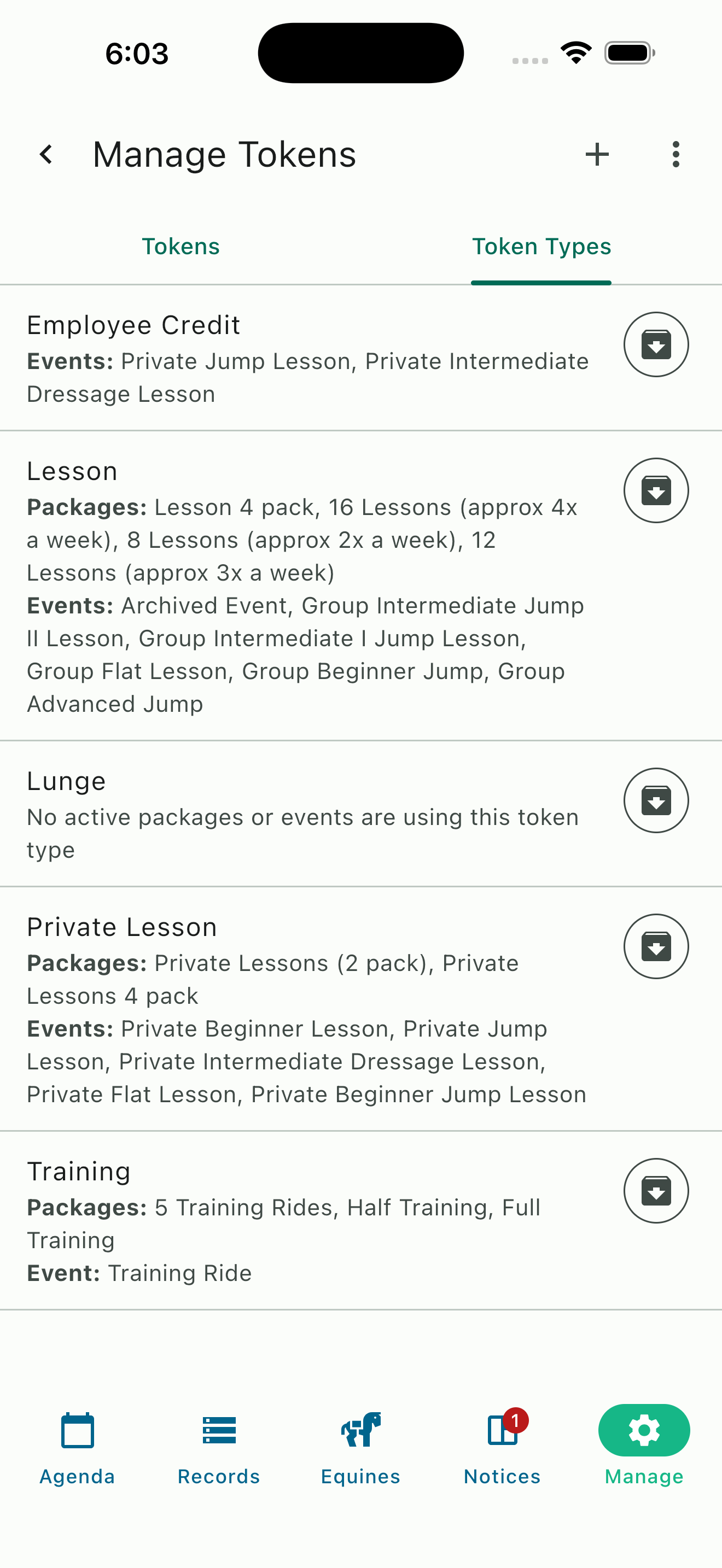
Custom token types with their associated packages and events
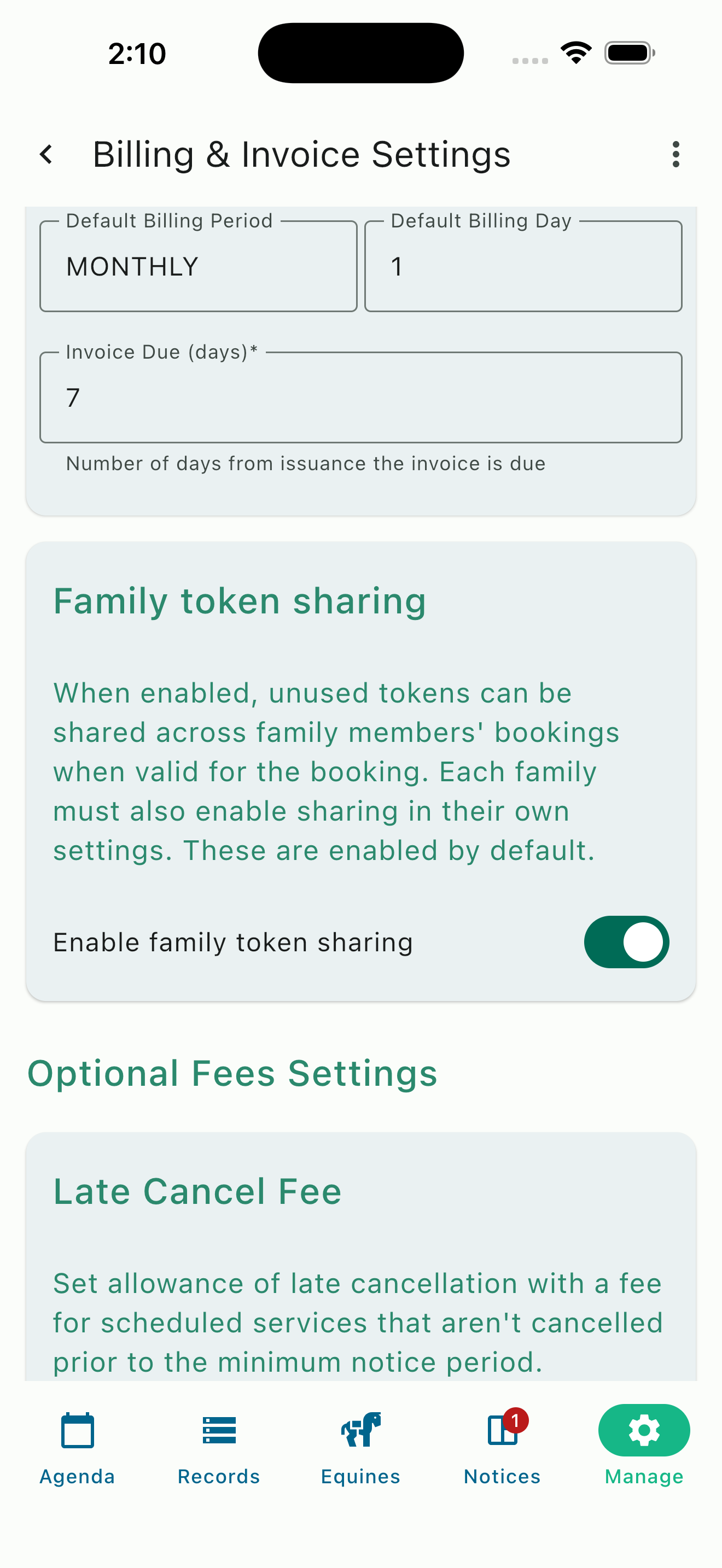
Billing settings: organization-level Family token sharing toggle
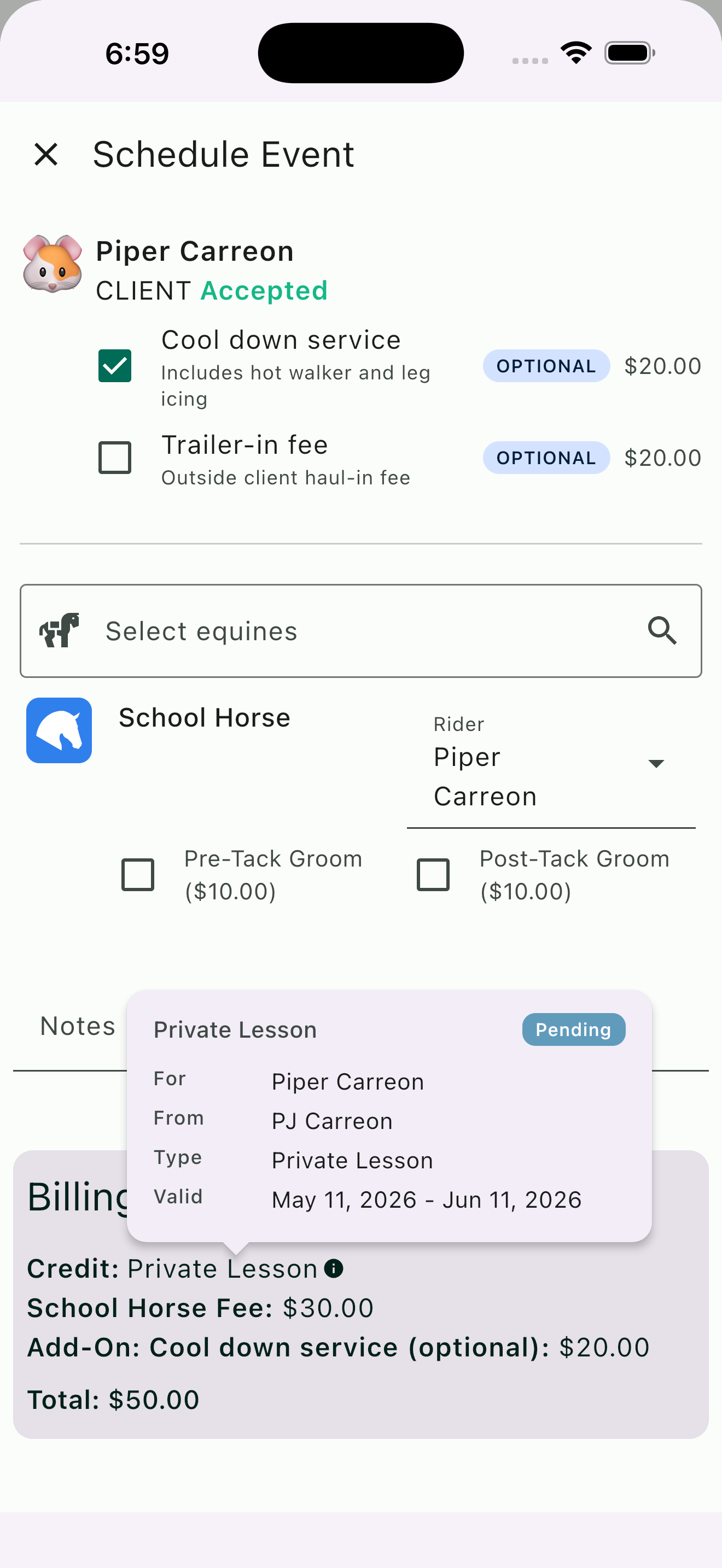
Booking summary: per-rider attribution on shared credits
Family Token Sharing NEW
Plenty of barns have families where more than one member rides — a parent and a child, two siblings, or a whole household working through the same training program. Until now, sharing a prepaid package across those family members meant manually moving credits or buying duplicate packages. Family Token Sharing removes that friction entirely.
One package, shared across the family. When family members are linked through a Family Account, any prepaid package owned by one member is available to every other linked member. A parent can purchase a single 12-pack of lesson credits and any of their linked riders can book against that shared balance, with no reassignment or separate accounts.
Per-rider attribution. When a credit is consumed, the system records which family member used it on which booking. That attribution appears in four places: the booking summary, the admin Token Manager, the family's own Token Manager, and as a line item on the invoice. Admins see usage across every family; families see usage within their own group.
Compatible with existing token features. Family Token Sharing uses the same underlying token system as individual prepaid packages. Custom token types, expiration dates, manually issued tokens, and overage billing all behave the same way. The only difference: credits draw from the shared family balance instead of a single rider's account.
Three layers of control, all on by default. Family Token Sharing is enabled out of the box at every level: across the organization, on every Event Product, and for every linked family. Anyone who wants something different can opt out deliberately. A barn (Manager+) can disable sharing org-wide in Billing settings, or leave it on and disable it on specific Event Products. For example, a barn could leave sharing on for lesson packages while disabling it for training packages so training credits stay tied to the individual rider. Each individual family group can opt-out of family sharing should they choose to, if they feel that makes the most sense for them.
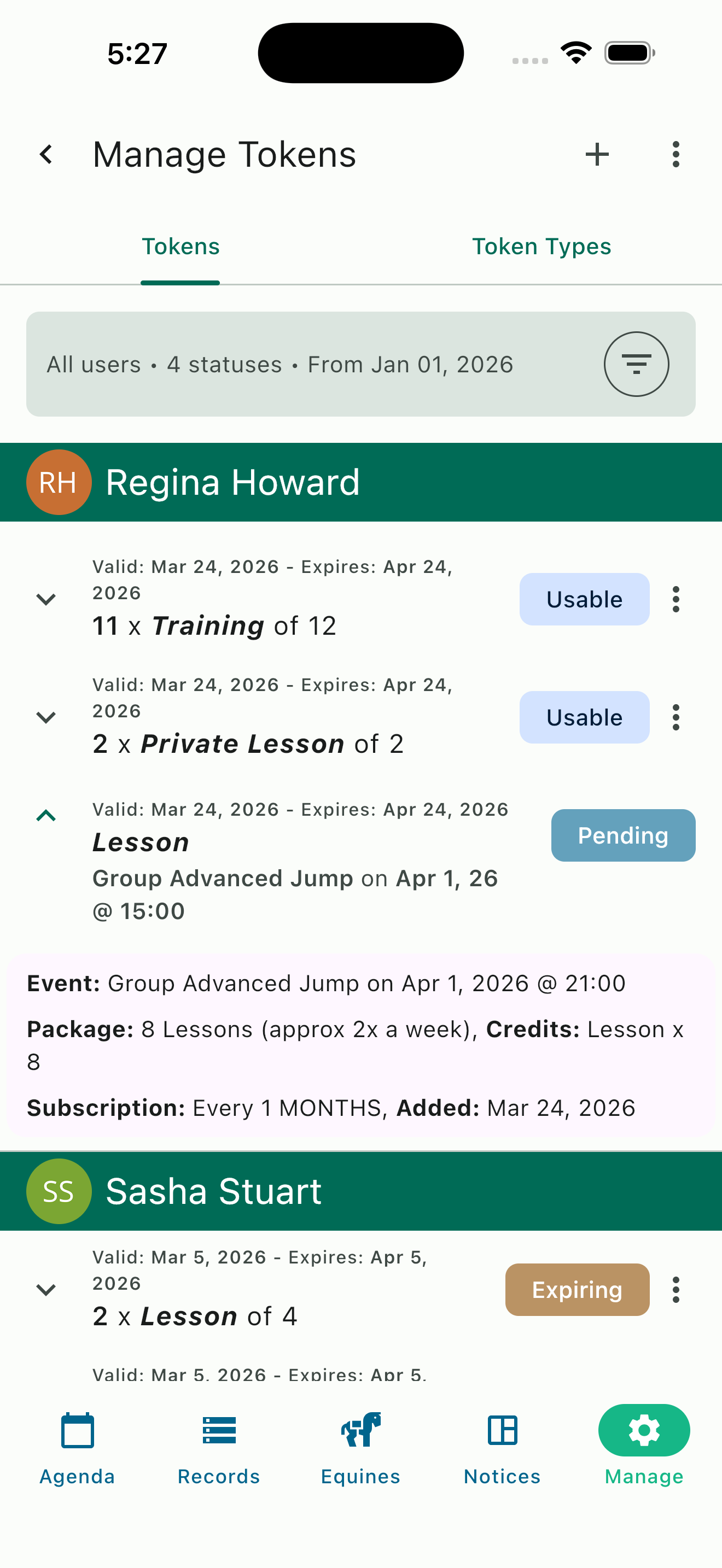
Token Manager: per-client credit inventory with package and expiration details
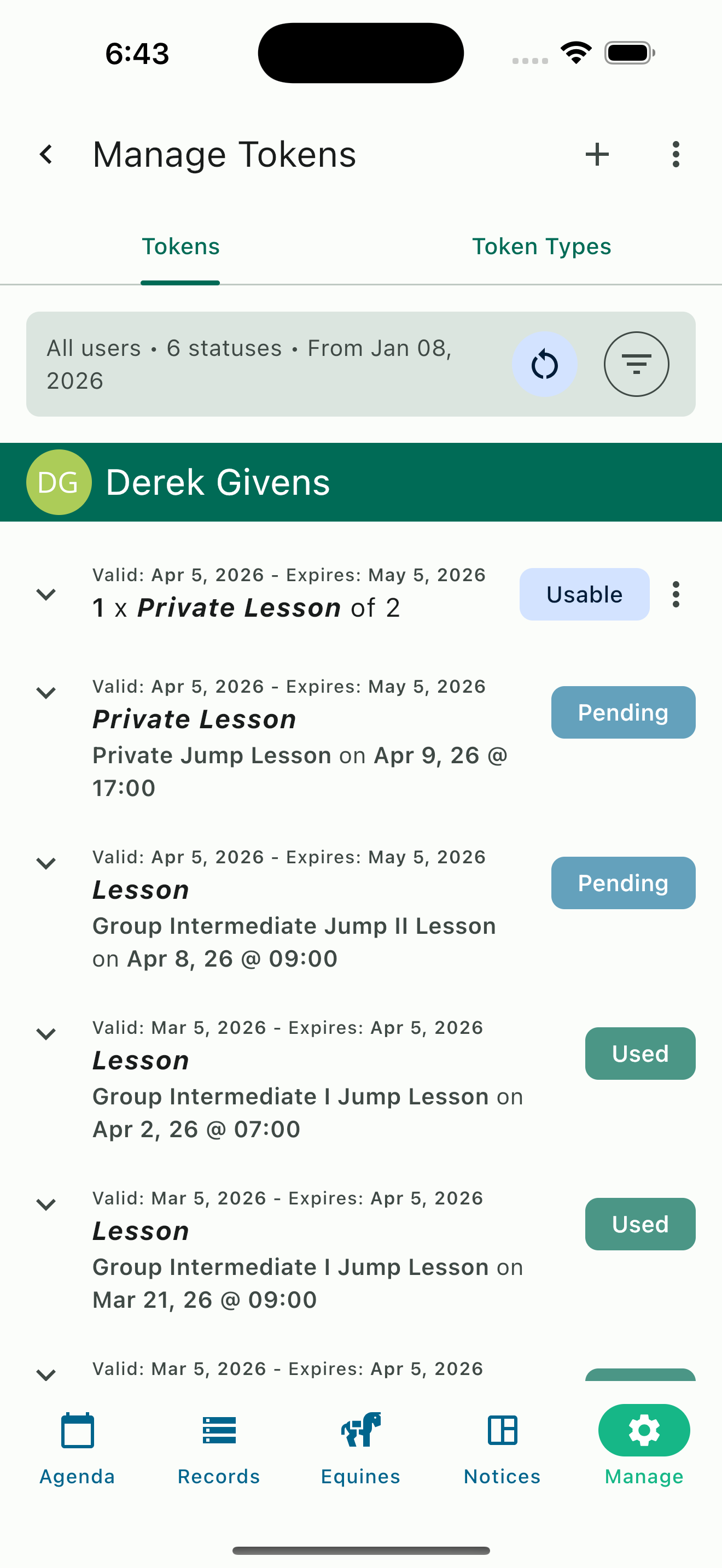
Token Manager: full lifecycle view from usable to pending to used
Real-Time Credit Tracking
Both trainers and clients have full visibility into credit balances at all times, eliminating the guesswork and back-and-forth that comes with manual tracking.
For barn managers and admins: The Token Manager provides a comprehensive dashboard where you can see every client's credit inventory at a glance. Each token displays its status, the package it came from, the subscription dates, and the event details if the credit has been used or is reserved for an upcoming session. Filter by client, token type, or status to find exactly what you need.
Token statuses keep you informed at every stage:
- Usable — Available and ready to be consumed
- Pending — Reserved for an upcoming booked session
- Used — Consumed by a completed session
- Expiring — Approaching its expiration date
- Expired — The token has expired
- Revoked — A manager or admin has manually revoked the token
For clients: Credit balances are accessible directly in the HayNet app under Account & Billing. Clients can see how many credits they have available, which are pending for upcoming sessions, and their complete usage history.
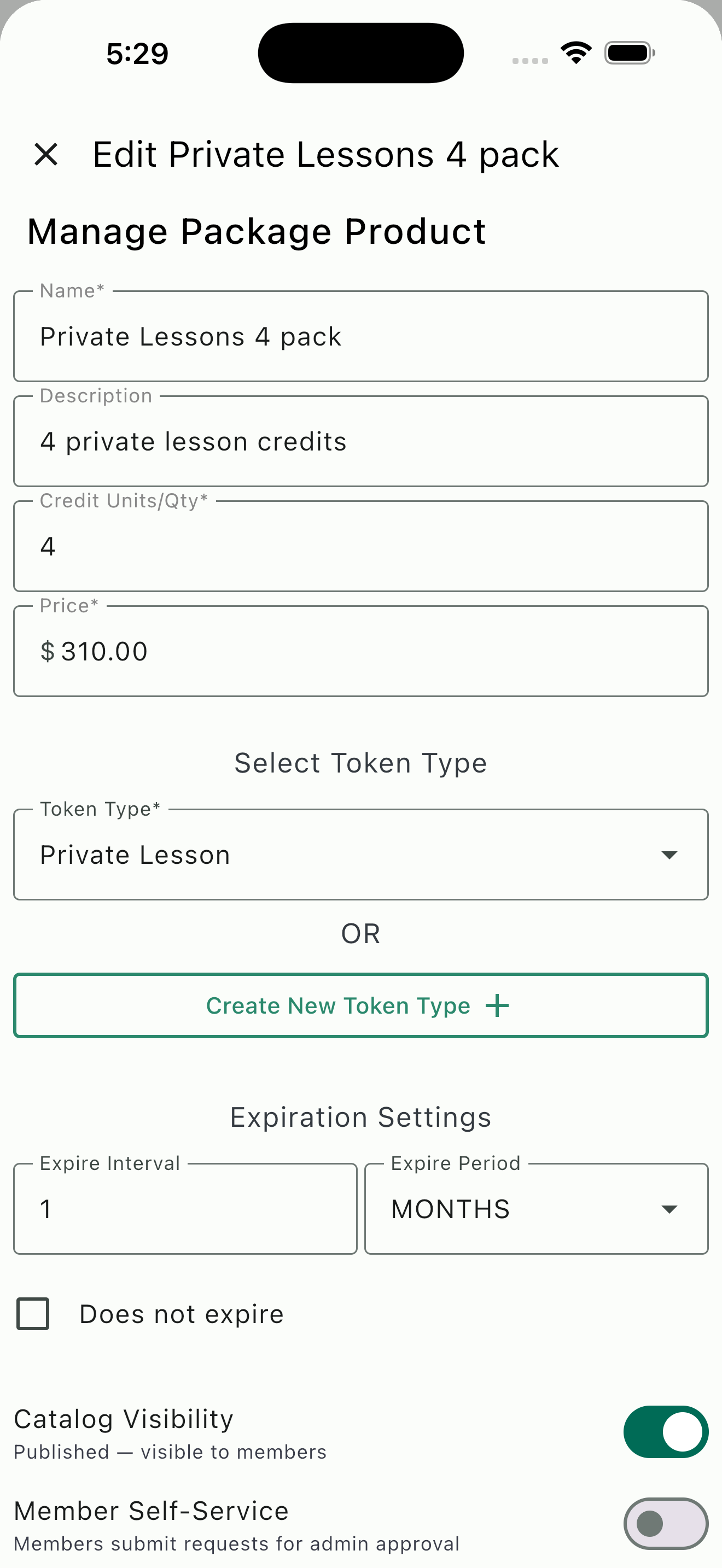
Package configuration: credits, pricing, token type, and expiration settings
Seamless Overage Handling
One of the most common concerns with prepaid packages is what happens when a client uses all their credits before the billing cycle ends. With HayNet, the answer is simple: nothing changes for the client.
When a client has no remaining credits for the event type they are booking, the session is billed at the standard rate defined on the Event Product. The booking flow works exactly the same way from the client's perspective except that they will see that the regular rate is being charged vs a credit being used for the booking in the billing summary section on the booking. We are working on adding the ability to add top-up credits in the future as an option as well!
All charges accrued will appear on their next invoice. This means your programs keep running smoothly even when a client rides more than their package covers. Clients who consistently exceed their package allowance are also natural candidates for an upgrade to a higher-tier package.
Manual Token Management
Not every credit comes from a package subscription. There are always situations where you need to assign credits outside the normal billing flow, and HayNet gives you the tools to handle those cases cleanly.
Make-up lessons: When a client misses a session due to weather, illness, or a barn-side cancellation, you can assign a replacement credit directly to their account so they can reschedule at no additional cost.
Working students: Assign lesson or training credits to working students as part of their arrangement. Credits are tracked the same way as purchased ones, so both you and the student have a clear record of what has been used.
Promotional or complimentary credits: Running a trial offer for new clients or rewarding a loyal boarder with a free lesson? Assign credits manually with no package subscription required.
Token revocation: If you need to remove credits from a client's account, you can revoke individual tokens with a reason that is tracked for your records. Revoked tokens are clearly marked in the audit trail so there is always a record of what happened and why.
Manage tokens: assign, review, and revoke credits with full audit trail
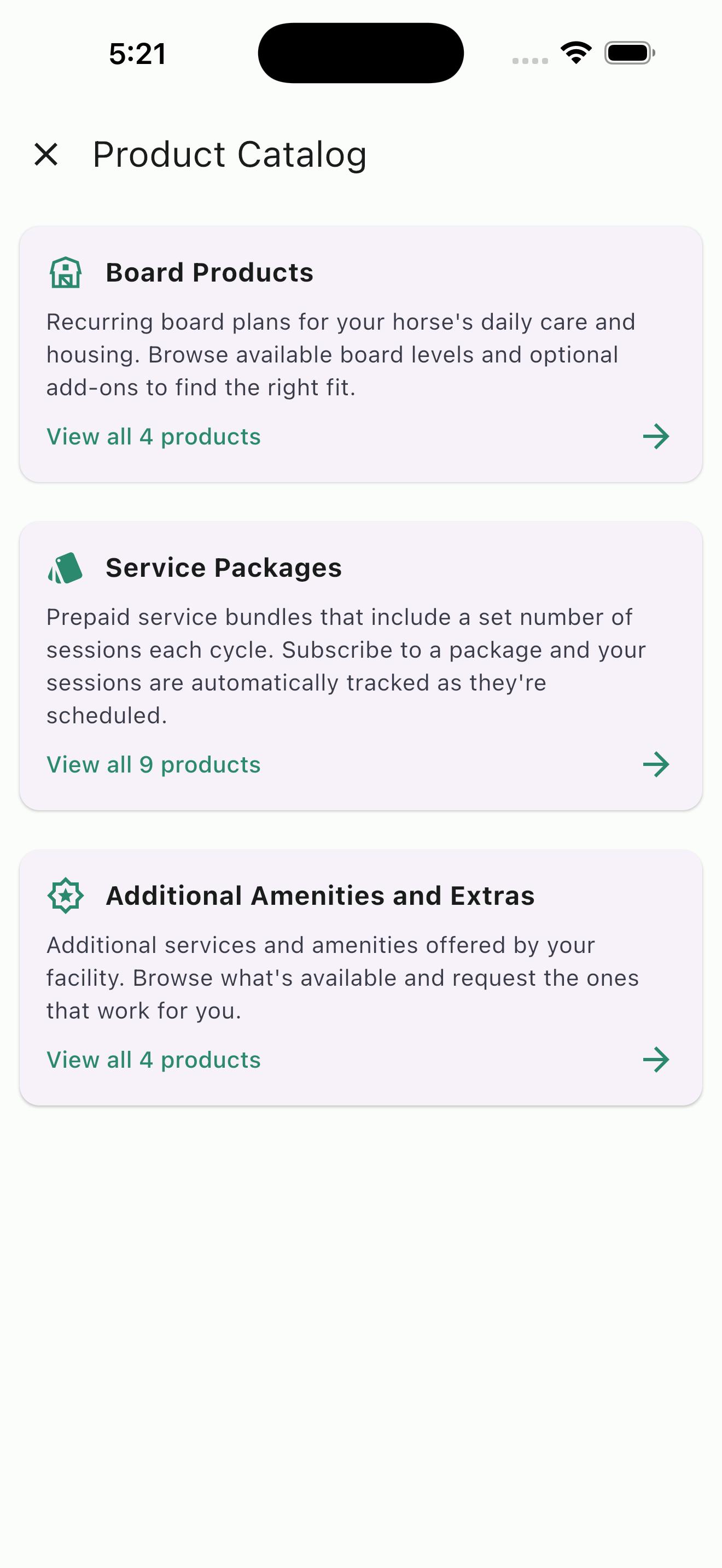
Product catalog: clients browse board, packages, and amenities in one place
Client Self-Service Catalog
Your clients can browse and request prepaid packages directly through HayNet's product catalog without needing to call, text, or email you. The catalog displays your available packages alongside your board products and other offerings, organized into clear categories so clients can find what they need quickly.
Each package listing shows the package name, number of credits included, price, and token type so clients understand exactly what they are purchasing. When a client finds a package that fits their needs, they can add it to their cart and submit a request. You review and approve the request, and the subscription is activated on their account.
This self-service approach saves you time by letting clients explore your offerings on their own schedule. Rather than fielding individual questions about what packages are available and how much they cost, your catalog serves as an always-available reference that clients can browse at any time from their phone or computer.
Ready to boost commitment and predictable revenue?
Start offering prepaid packages today. Set up your first package in minutes and let HayNet handle the tracking.
Get Started Free