Smart Scheduling
The schedule is the heart of HayNet. Every lesson, training ride, and barn activity flows from it — billing, records, and tacking lists all operate outward from what you schedule.
The Operational Center of Your Barn
Running a barn means juggling dozens of moving parts every day: trainers, clients, horses, arenas, grooms, and the clock itself. HayNet's Smart Scheduling was designed to be the operational center of your entire business. When you schedule an event in HayNet, you are not just putting something on a calendar. You are setting into motion the processes that generate billing, create historical records, produce groom and tacking lists, and keep your resources properly allocated.
Unlike generic calendar tools, HayNet understands the realities of equestrian operations. It knows that an arena can only hold so many horses safely, that a school horse needs time between rides, and that a parent may need to book on behalf of their child. Every scheduling decision you configure, from booking windows to cancellation policies to participant limits, is enforced automatically, so your barn runs the way you intend it to, even when you are not watching the calendar.
Whether your clients book their own lessons or you build the weekly agenda yourself, HayNet gives you full control with the flexibility to work however fits your operation best. Admins can always schedule on behalf of any member, while clients can self-book when you have enabled that capability for a given Event Product.
Event Products: Your Services, Your Rules
Every bookable event in HayNet is built on an Event Product — a predefined service template that defines exactly how that activity works. When you set up an Event Product, you configure everything: the base price, add-on fees (like school horse fees), booking windows that specify which days and times the event is available, participant limits, and client booking capabilities. This means that once your Event Products are configured, booking a lesson or training session is fast and consistent every time.
Clients who are enabled for self-booking see only the available time slots within the booking windows you have defined. They select a time, confirm their booking, and HayNet handles the rest — checking for conflicts, reserving the resource, and queuing the appropriate billing. There is no back-and-forth texting about availability, no scribbling in a paper planner, and no forgetting to bill for a session that happened three weeks ago.
For barns that prefer to manage scheduling centrally, admins and managers can build out the weekly agenda by scheduling events on behalf of clients. Either way, the Event Product ensures that pricing, limits, and rules are applied uniformly across every booking.
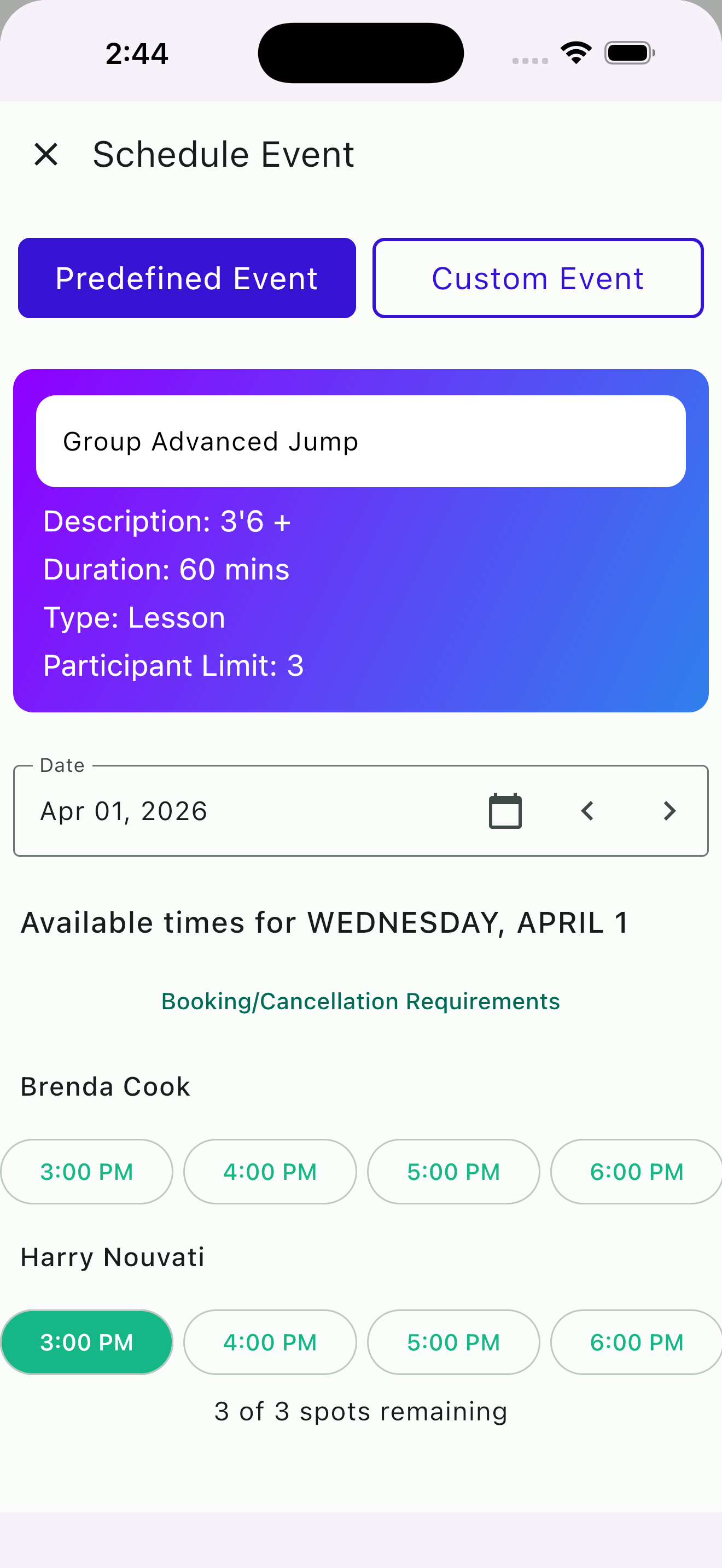
Booking a predefined event with available time slots
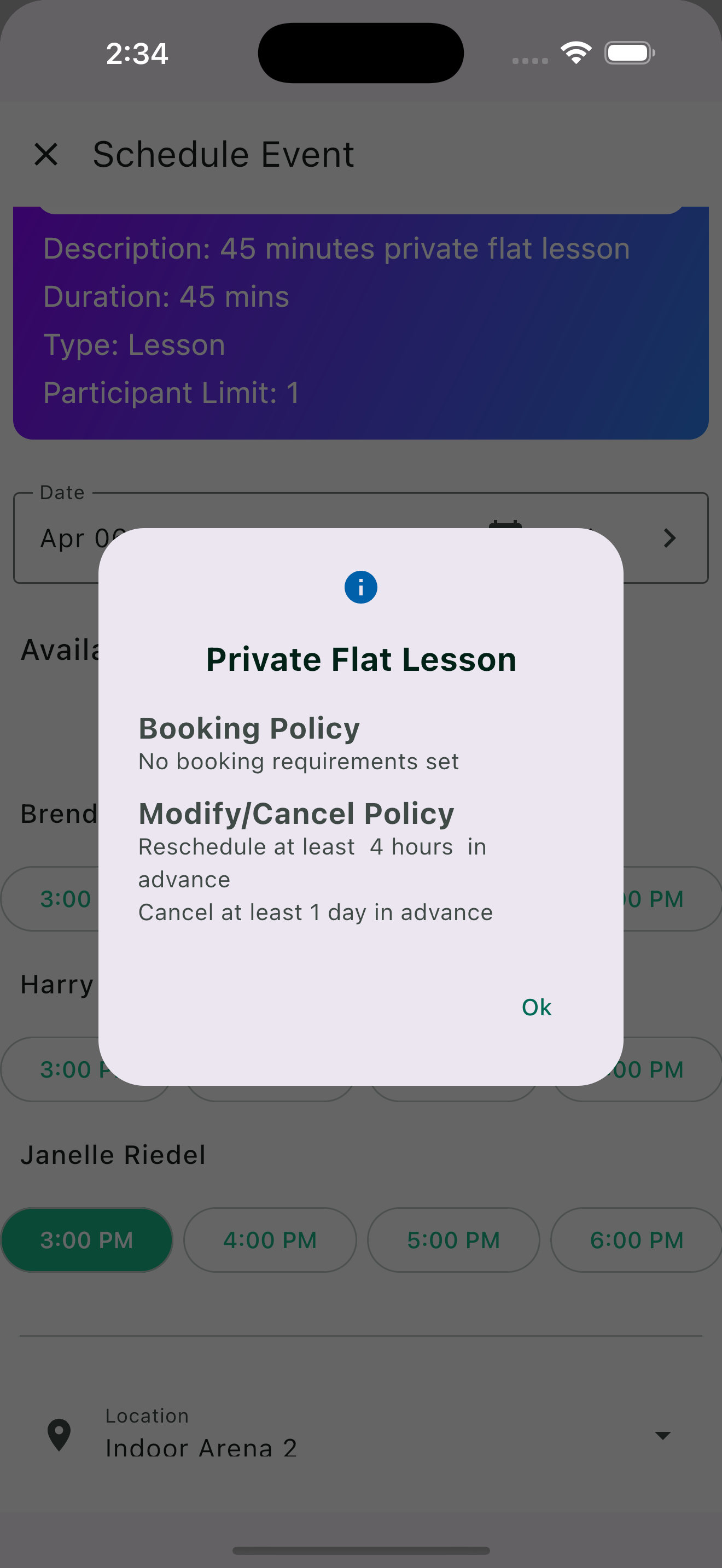
Booking and cancellation policy
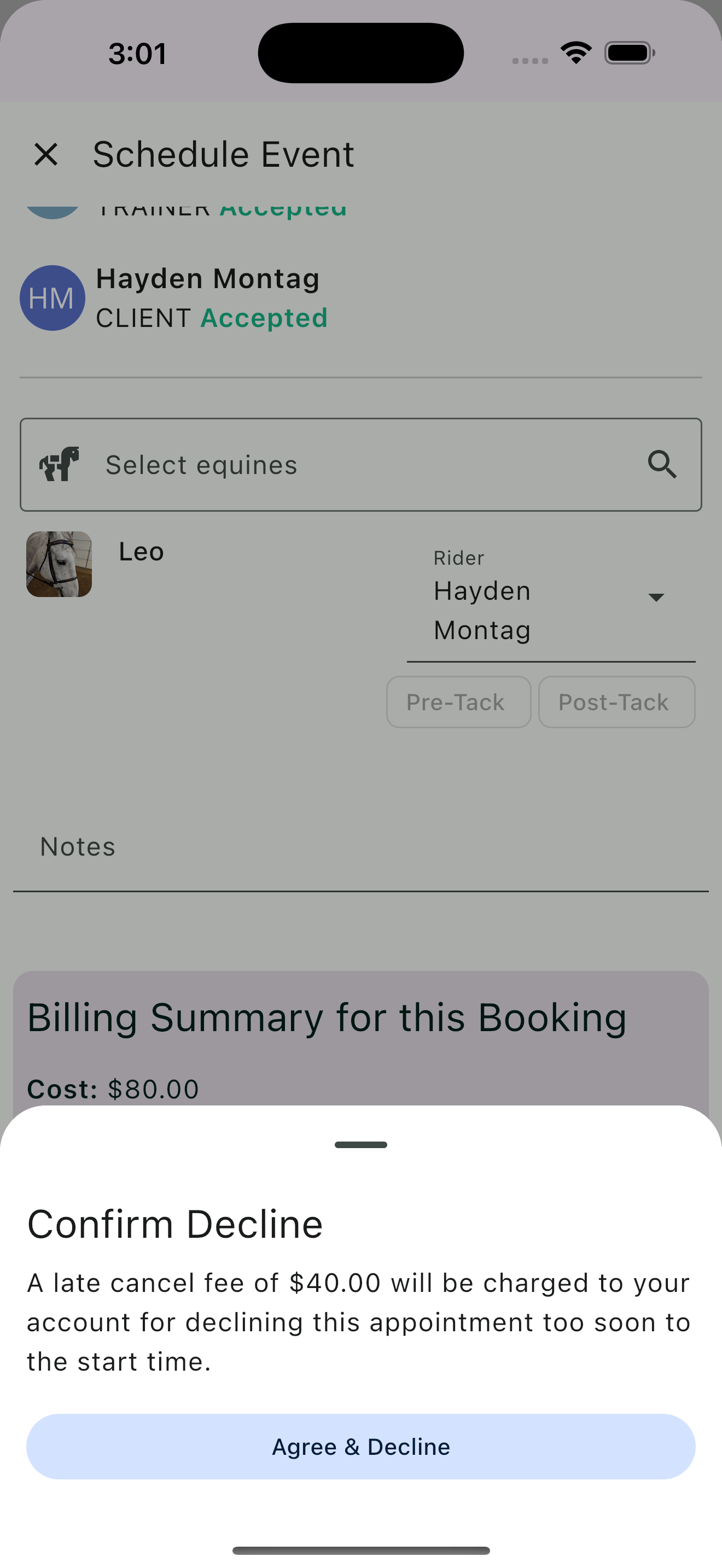
Late cancel fee warning
Booking, Rescheduling, and Cancellation Rules
Last-minute cancellations and constant rescheduling are among the biggest revenue drains for lesson and training barns — and they often persist because policies either don't exist, aren't clearly communicated, or aren't consistently enforced. HayNet lets you define booking, rescheduling, and cancellation rules directly on each Event Product so they are communicated upfront and enforced automatically — no awkward conversations, no inconsistent enforcement, and no lost revenue from last-minute no-shows.
Set booking windows to control which days of the week and times of day are open for a particular event. Define rescheduling cutoffs so clients know exactly when they can still move a lesson. Configure cancellation rules with automatic late cancellation fees that are applied to the client's next invoice without you lifting a finger. These settings are defined as part of the Event Product's billing options configuration, and are transparently communicated to clients.
For barns that have experienced the frustration of last-minute cancellations leaving empty arena time and lost income, this is a significant shift. Your policies are no longer just words in a barn handbook — they are built into the booking system itself. Clients see the rules when they book, and the system enforces them consistently. This protects your time, your revenue, and your trainers' schedules.
The Agenda
The Agenda is your barn's daily command center. It lays out each day's events in a clear, scrolling chronological list — showing the event name, trainer, participating clients and equines, assigned arena or resource, and the time. It is the view your barn staff will reach for first thing in the morning to know exactly what the day looks like.
Filter the agenda by specific users to see just one client's or trainer's schedule, or view the full barn at once. Users with a Groom+ role can filter to show only events that require groom or tacking service, so your barn staff sees exactly what they need to prepare without wading through unrelated bookings.
When clients submit booking requests, they appear directly on the agenda with inline accept and decline buttons — so you can approve or reject without leaving the schedule view. The agenda updates in real time as bookings are made, rescheduled, or canceled, whether you are in the barn office or checking from your phone on the road.
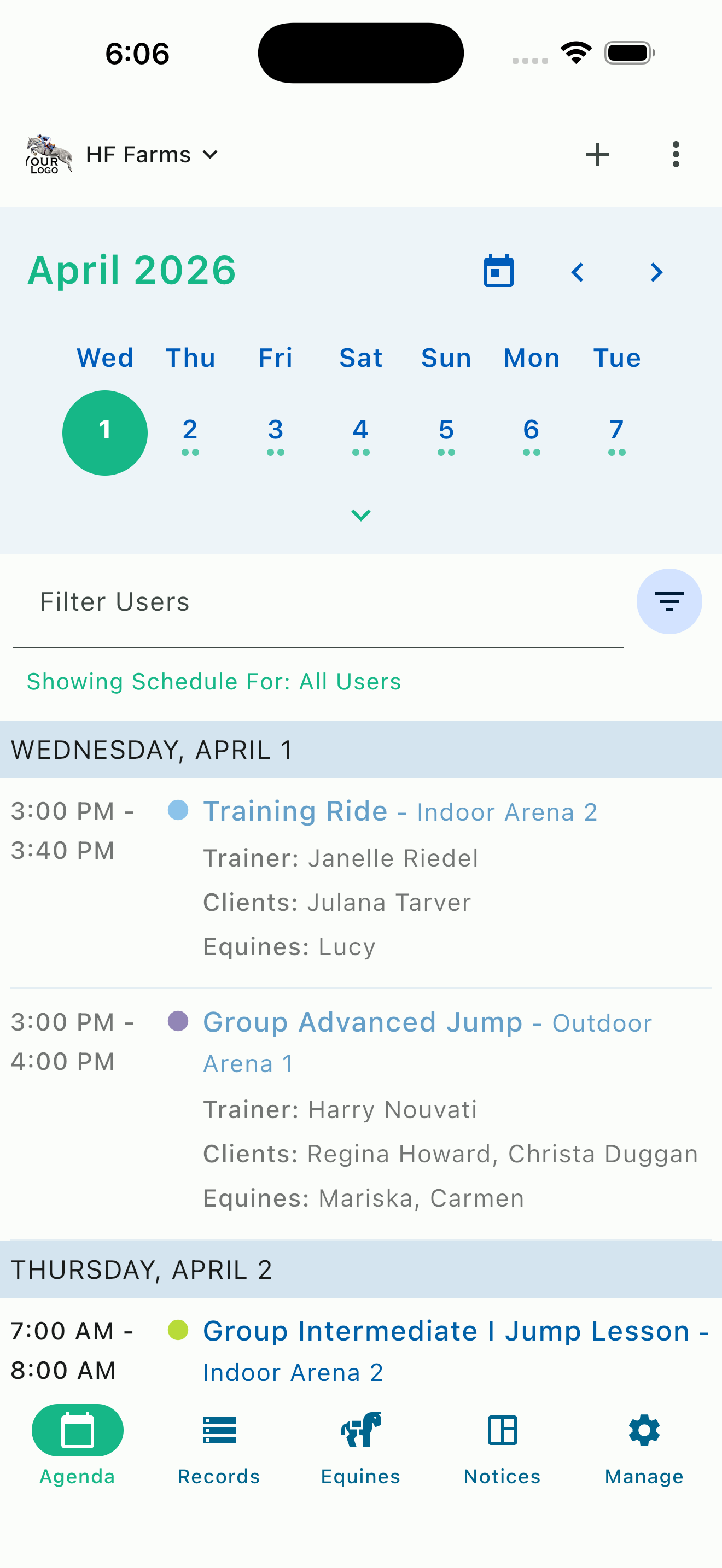
Agenda with week calendar
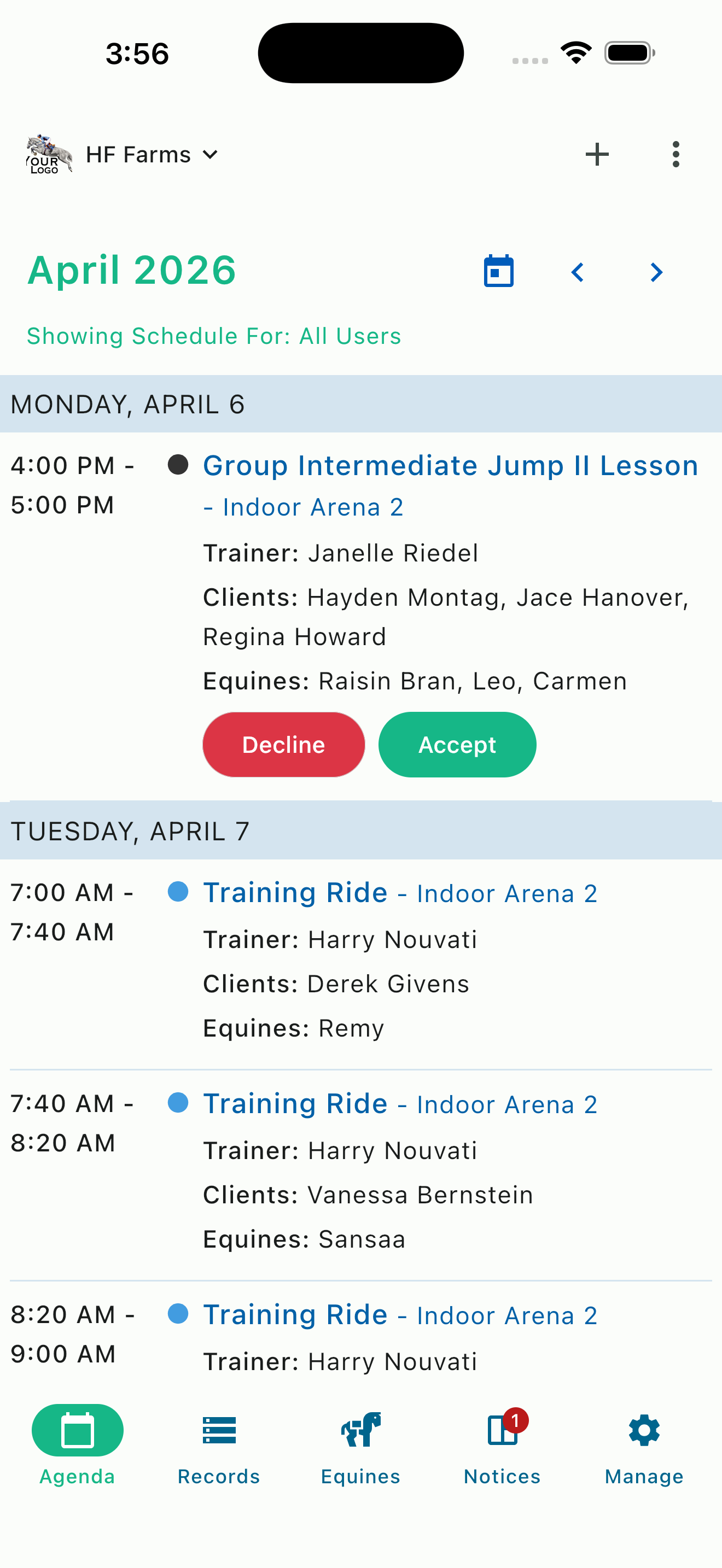
Inline accept/decline requests
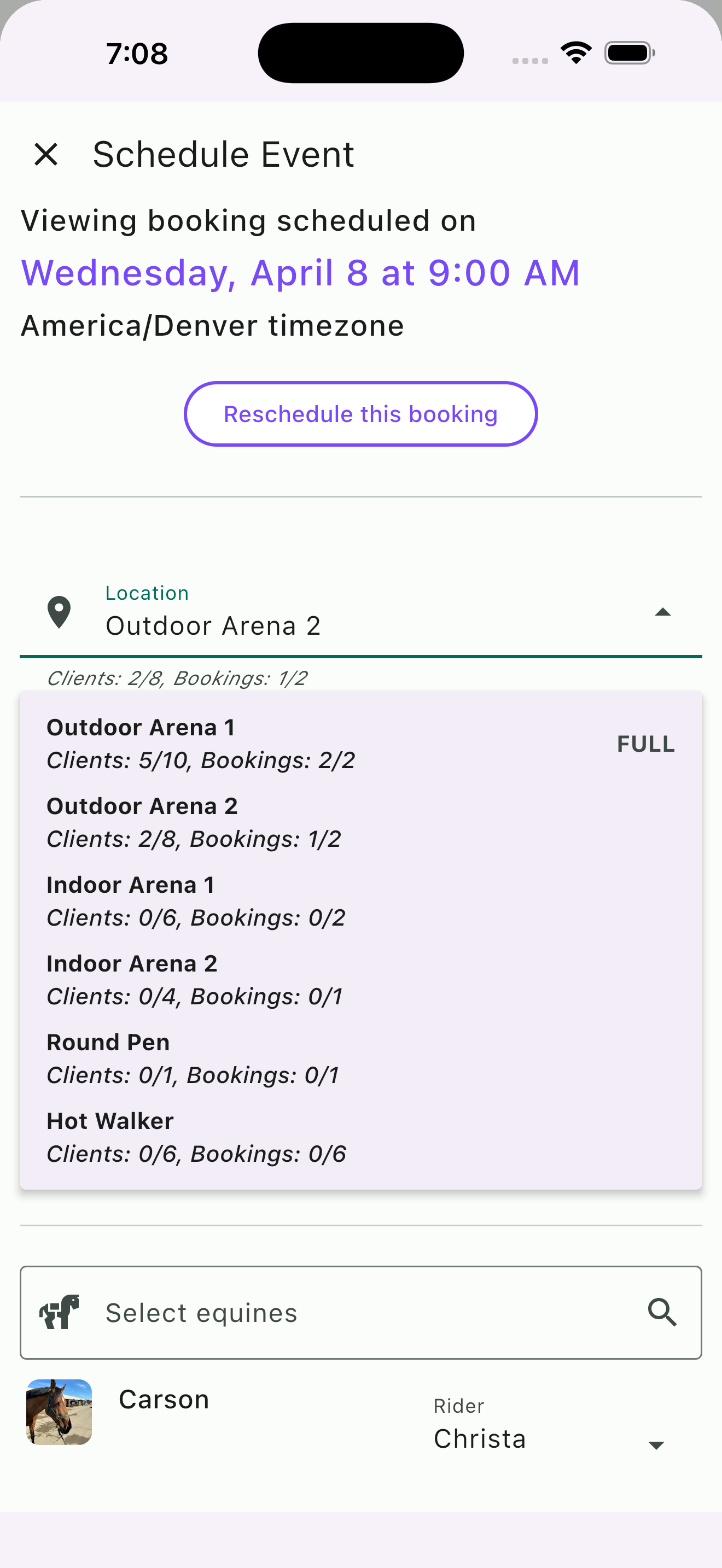
Resource picker with capacity indicators
Conflict Detection and Arena Crowd Management
Overcrowded arenas are not just inconvenient — they are a safety concern. HayNet helps you stay on top of capacity by letting you define limits for every resource in your barn — arenas, round pens, walkers, outdoor rings — with a maximum client limit and a maximum number of concurrent bookings. When a resource is overbooked, HayNet flags it so you can see at a glance what's over capacity and decide how to handle it.
We intentionally chose not to hard-block bookings when limits are exceeded. Every barn has situations where the right call is to allow an extra rider in the arena — a make-up lesson, a quiet horse that won't crowd the group, or a client who drove an hour and needs to ride today. Blocking that booking would create frustration and cost you revenue. Instead, HayNet gives you the information and lets you make the decision that's best for that specific scenario.
Location resources are assigned automatically when events are booked — clients don't need to choose an arena themselves. If a resource is at capacity, the system tries the next available one. If nothing is open, the agenda shows the event without a resource assigned, which serves as a clear signal for the trainer or manager to step in and decide where to place it. You set the thresholds, HayNet watches them, and you stay in control.
Custom Events for One-Off Activities
Not everything on your barn's calendar fits neatly into a predefined Event Product. Vet rechecks, farrier visits, health and maintenance appointments, saddle fittings, a one-time clinic with a visiting trainer — these are activities that need to appear on the schedule and involve specific horses and people, but they do not follow a repeating template. HayNet handles these through custom events, which let you schedule one-off activities directly without tying them to an Event Product.
Custom events still become historical records after they are completed and finalized, giving you a complete timeline of everything that happened with each horse — not just the activities tied to Event Products. This is especially useful for tracking veterinary history, maintenance schedules, and any one-off activity that you want documented.
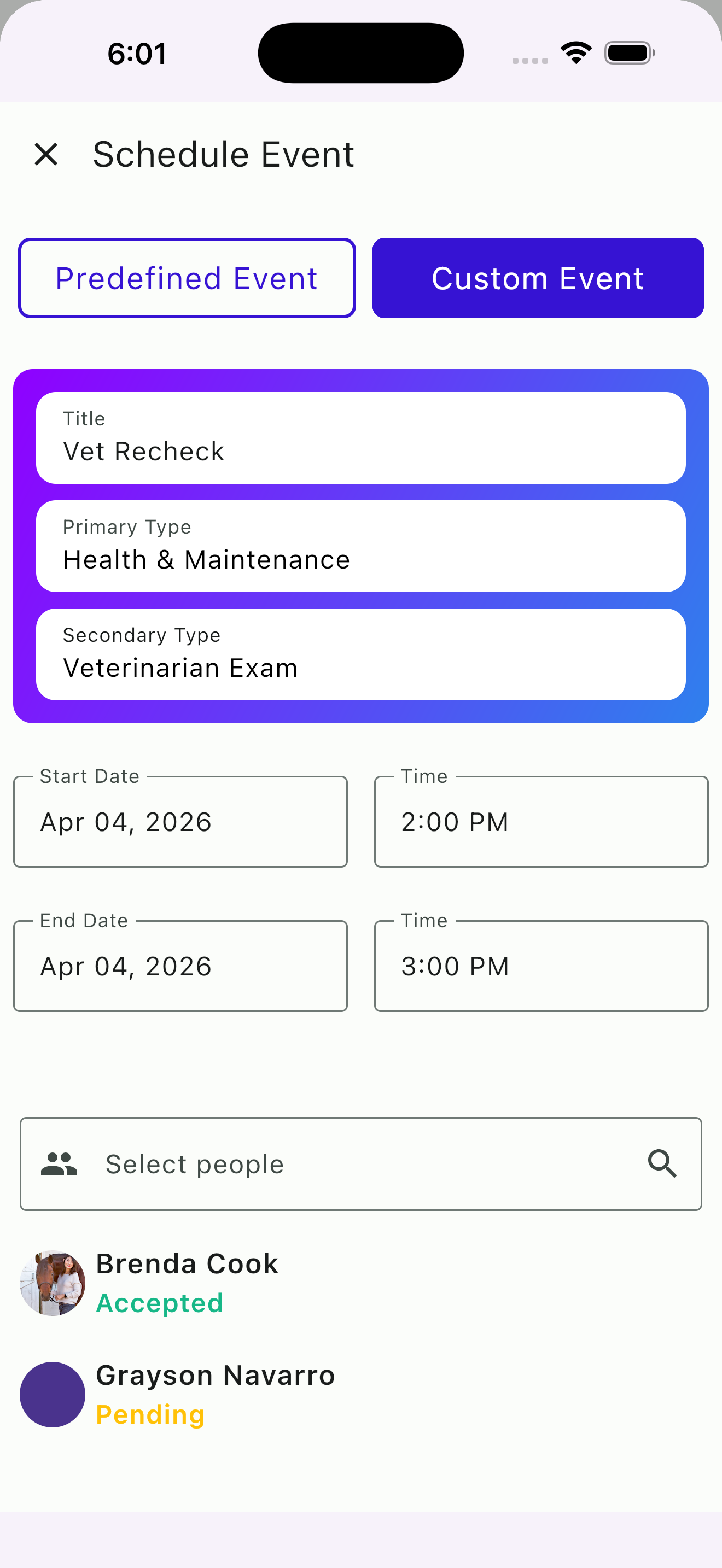
Creating a custom event
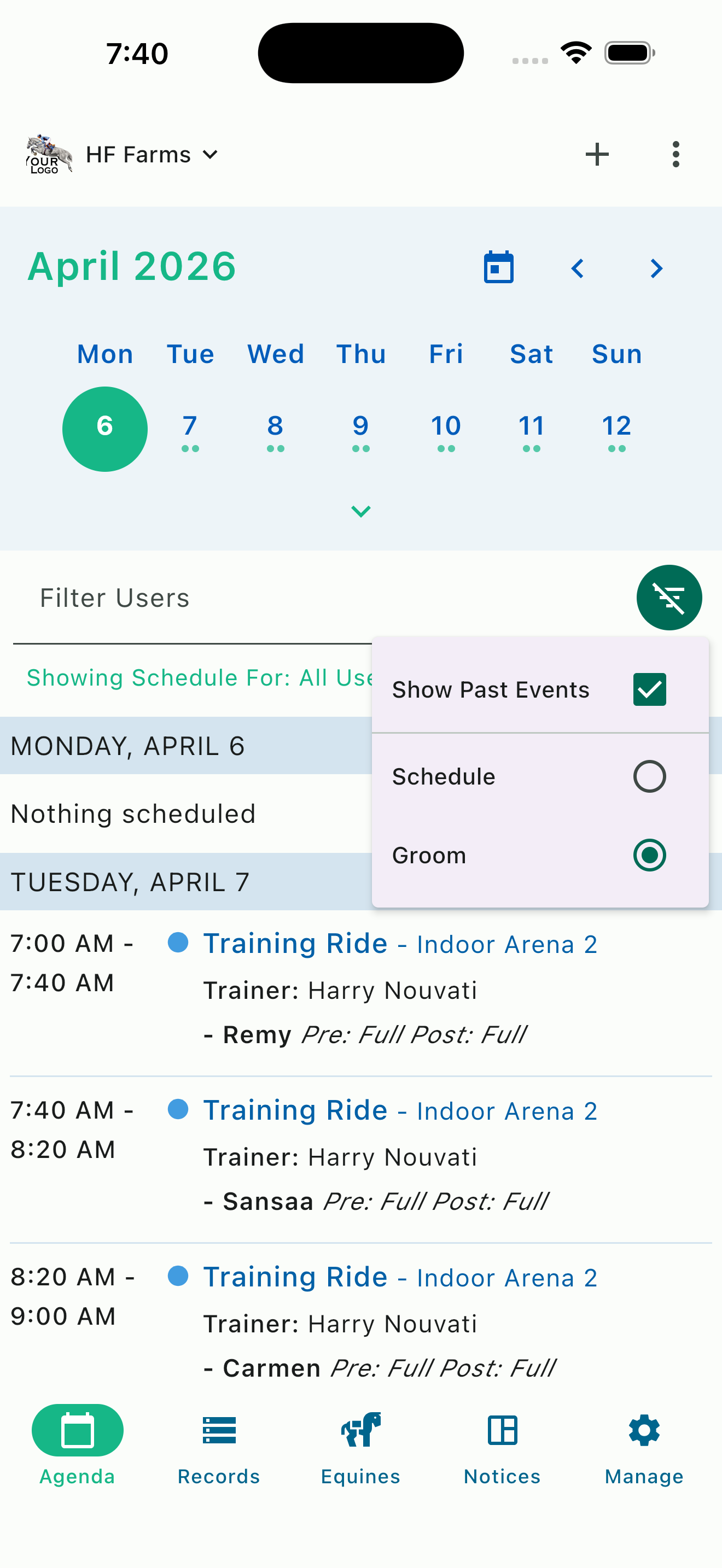
Groom and tacking list
Auto-Generated Groom and Tacking Lists
On a busy lesson day, your grooms need to know exactly which horses to pull, tack, and have ready — and in what order. HayNet generates groom and tacking lists automatically from your schedule. As events are booked and horses are assigned, the information your barn staff needs is already organized and ready, without anyone having to compile a list by hand or relay instructions through a chain of text messages.
This is the kind of detail that makes a barn run smoothly behind the scenes. Users with a Groom+ role can toggle the Groom filter on the agenda to see only events that require groom service. Each event shows the assigned horse along with its pre-tack and post-tack status — so a groom can scan the day and know exactly which horses need to be pulled, tacked, and untacked for each ride. No guesswork, no missed horses, no frustration or wasted time because someone forgot to communicate a schedule change.
We recognize that not all barns offer full groom service, but for those that do this feature is especially valuable. Clients can request groom service tack-up/down directly through their booking. Clients can stop texting the grooms while driving to the barn causing them to scramble to get their horse ready. Grooms can see their entire day laid out with pre-tack and post-tack status for each horse. Whether your barn bills groom service per day, per occurrence, or as a flat monthly rate, the groom list ensures that every horse is ready when the rider arrives and handled properly after. It's the kind of behind-the-scenes coordination that top class facilities strive to provide, but it can be a struggle to execute.
Family Accounts: Parents Schedule for Children
In the equestrian world, a large portion of your clients are minors whose parents manage their riding activities. HayNet's Family Account system lets parents link their account to their children's accounts, giving them the ability to book events, view schedules, manage tokens, and pay invoices — all from a single login. There is no need for parents to know their child's password or log in and out of separate accounts.
Once family linking is established, a parent can book a lesson on behalf of their child just as easily as they would for themselves. The child can see the booking and invoices can be paid through the parent's account. Family Accounts support Parent/Family Manager and Child roles, as well as multiple adult Family Manager roles for families where both parents or guardians are involved.
This matters because it removes a common source of friction for your busiest client demographic. Parents who can quickly and independently manage their children's riding schedules from their own phone are more likely to book consistently, less likely to create scheduling confusion, and more satisfied with the overall experience your barn provides.
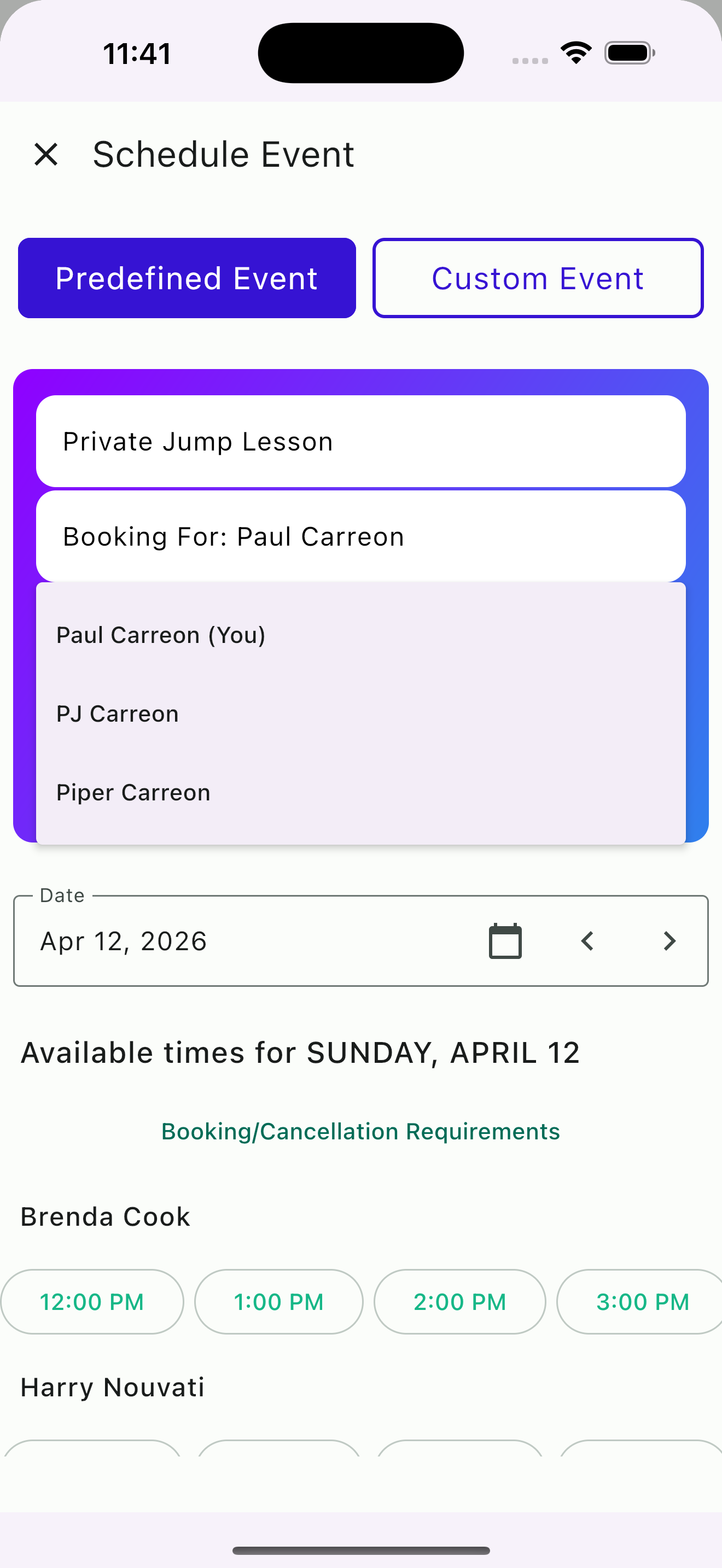
Parent booking for a child
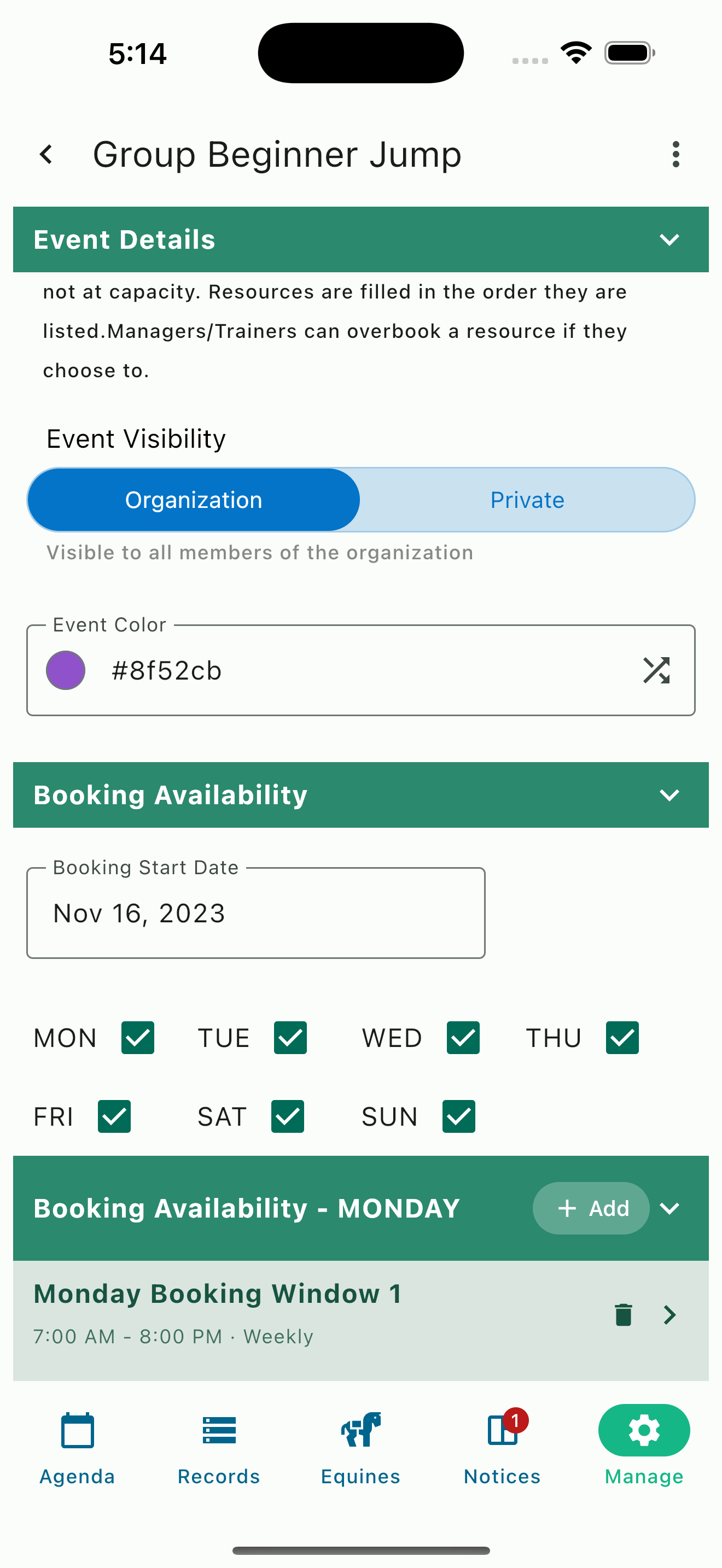
Event visibility settings
Public and Private Event Visibility
Not every event on your schedule should be visible to every member of your barn. HayNet gives you control over event visibility so you can choose whether clients can see a particular event or whether it is hidden from anyone who is not a participant. This is configured at the Event Product level, so you set it once and it applies to every booking of that Event Product.
Public events are visible to all members of your organization, which is useful for group lessons, open arena time, clinics, and other activities where you want clients to discover and join. Private events are only visible to the participants and users with staff roles, keeping sensitive or exclusive activities — like private training sessions, evaluations, or need-to-know activities — off the general calendar.
This level of control is important for operations of all sizes. A competitive training barn may want advanced jump sessions visible only to participants, while keeping lower level group lessons discoverable to encourage full capacity bookings, creating more value for your time. A lesson barn hosting a limited private clinic with a visiting trainer can keep that event hidden from the general schedule while still managing the logistics within HayNet. You get a single unified calendar for your operation, with the right level of visibility for each activity.
Resource Management: Arenas, Round Pens, and More
Your barn's physical spaces are finite and valuable. HayNet lets you define every bookable resource — indoor arenas, outdoor rings, round pens, hot walkers, trails, or any other space — and configure capacity limits for each one. For each resource, you set a maximum number of clients allowed at one time and a maximum number of concurrent bookings. When events are booked, HayNet assigns a location automatically based on your settings and current availability — clients don't need to choose an arena themselves.
If a resource reaches capacity, the system tries the next available one. If nothing is open, the agenda shows the event without a resource assigned — a clear signal for the trainer or manager to step in and decide where to place it. Users with elevated access roles can also manually select a location or choose to overbook a resource when the situation calls for it. HayNet handles the awareness so you can handle the judgment calls — because no algorithm knows your barn better than you do.
Resource management gives you visibility into how your facilities are being used. You can see at a glance which arenas are booked, which have availability, and how your space is utilized across the week. This information is valuable for long-term planning — whether you are considering adding an arena, improving footing, or evaluating whether a facility expansion makes sense for your business.
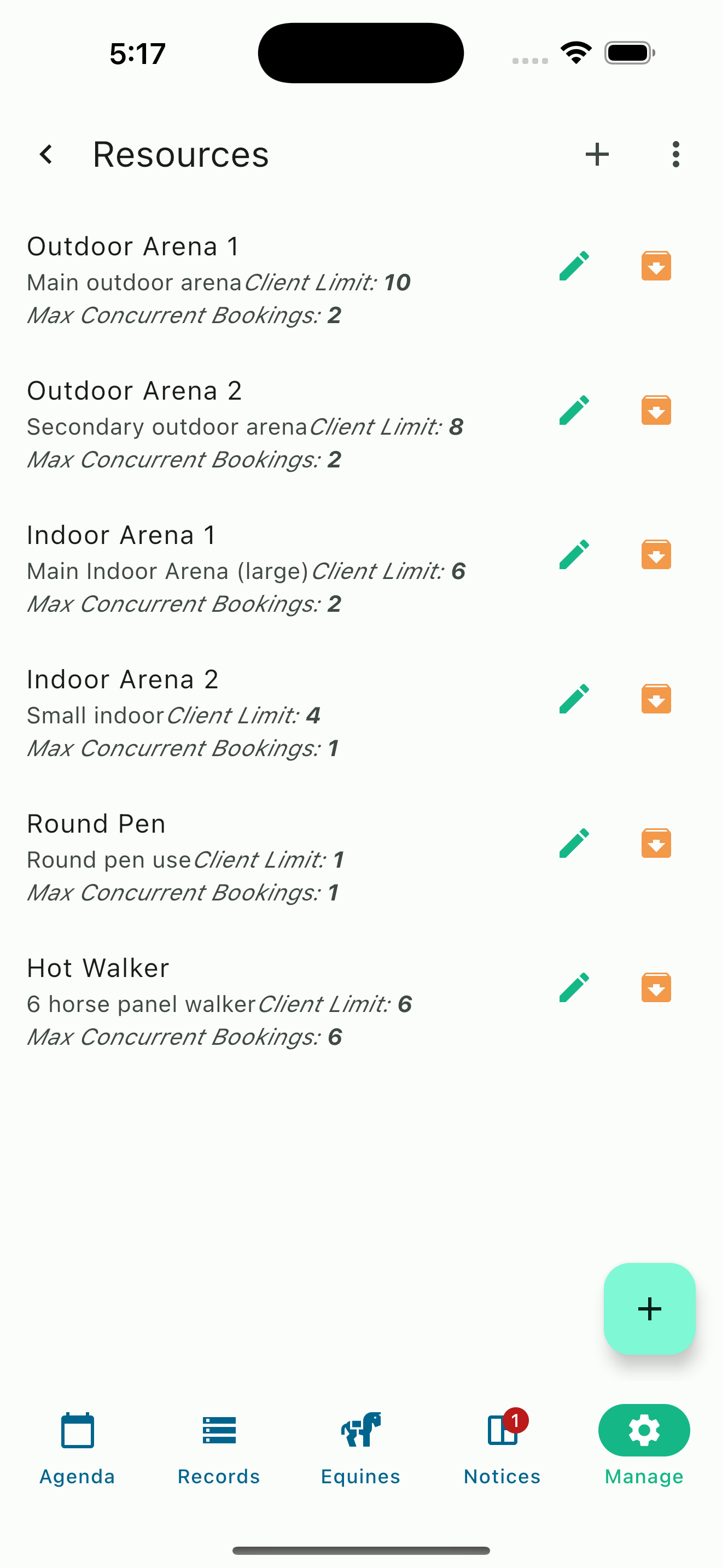
Resource list with capacity limits
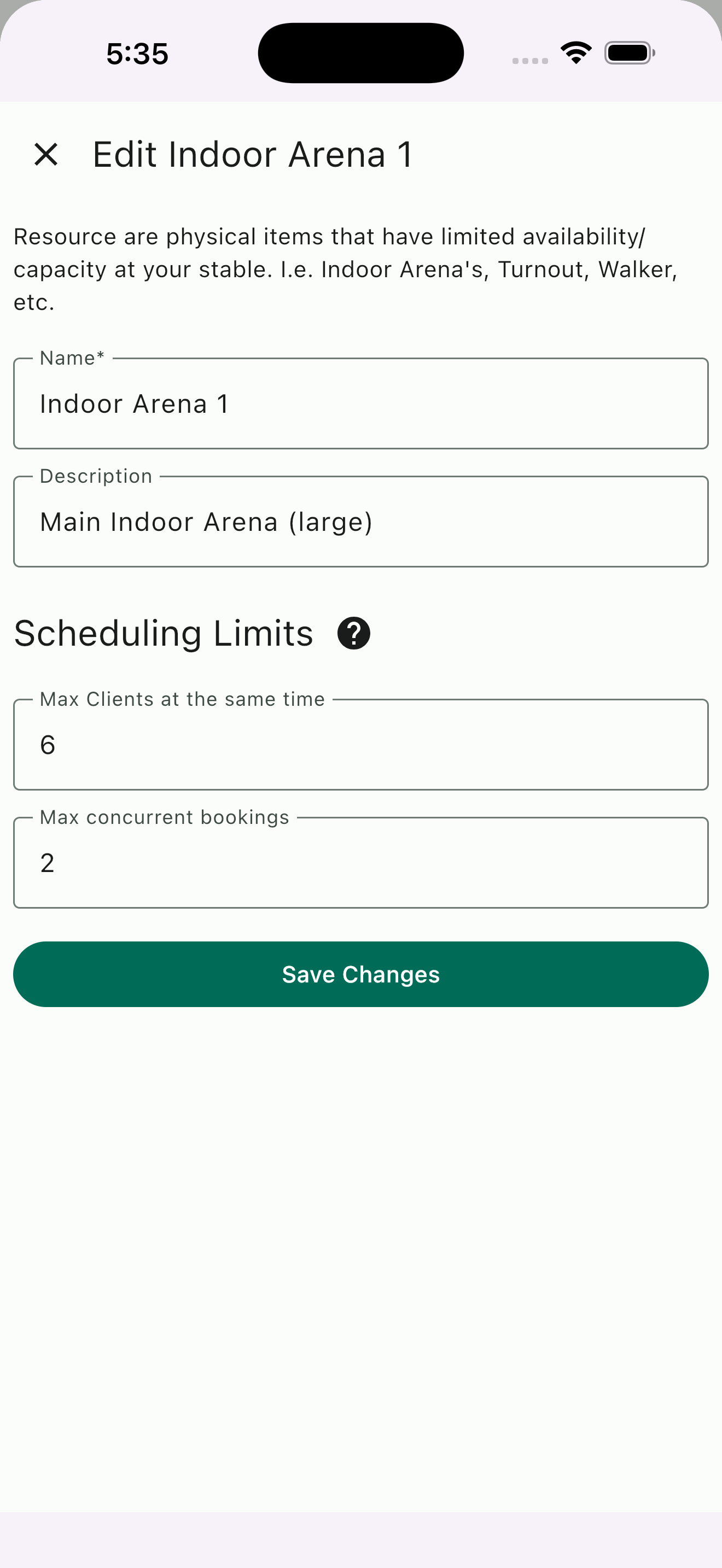
Edit resource scheduling limits
Ready to Take Control of Your Schedule?
Join the equestrian businesses that have stopped chasing calendars and started running their barns with confidence.
Get Started Free