Expenses & Asset Management

Log what the barn spends, bill back what you paid on a client's behalf, and see what every horse, trailer and piece of equipment earns and costs over time.

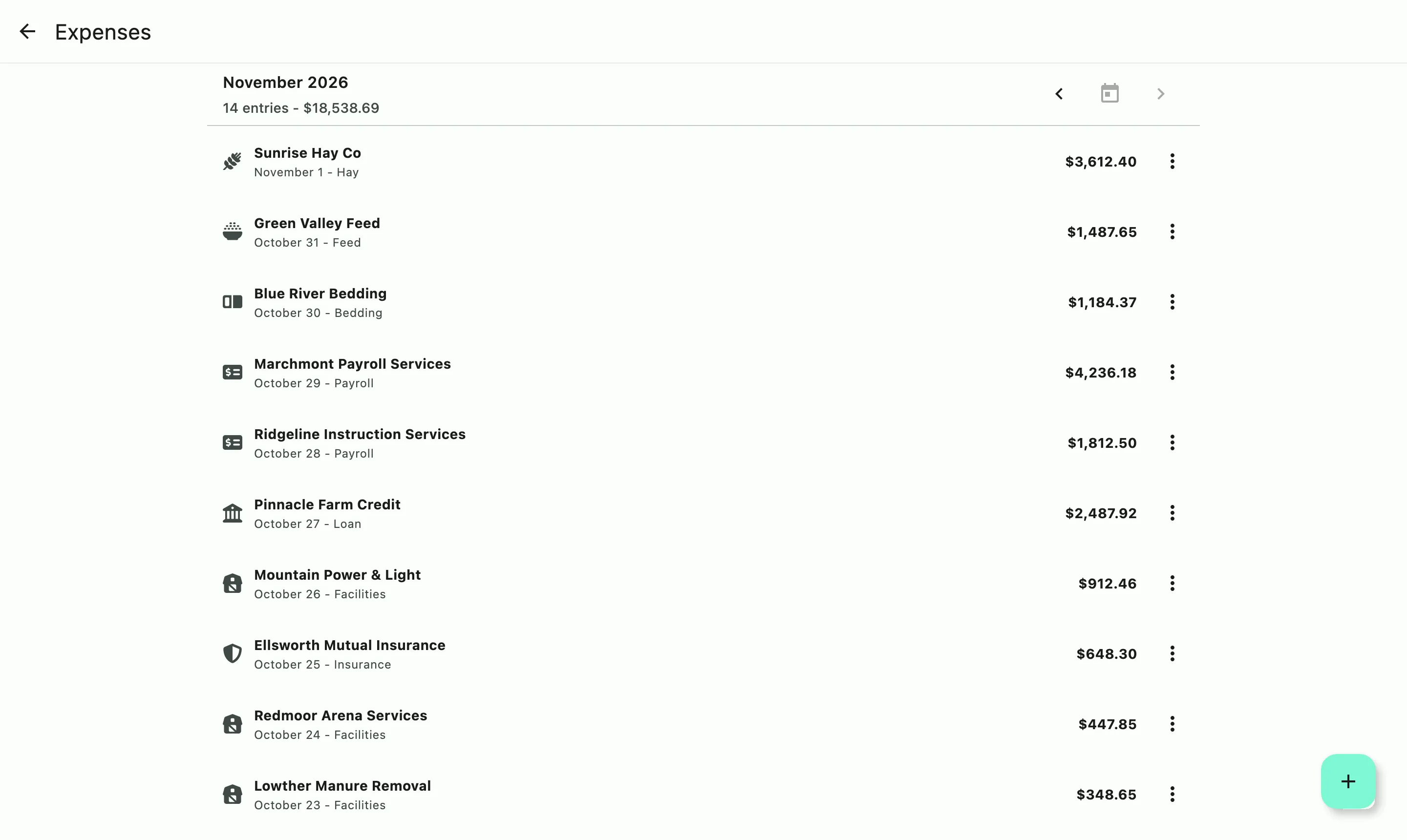
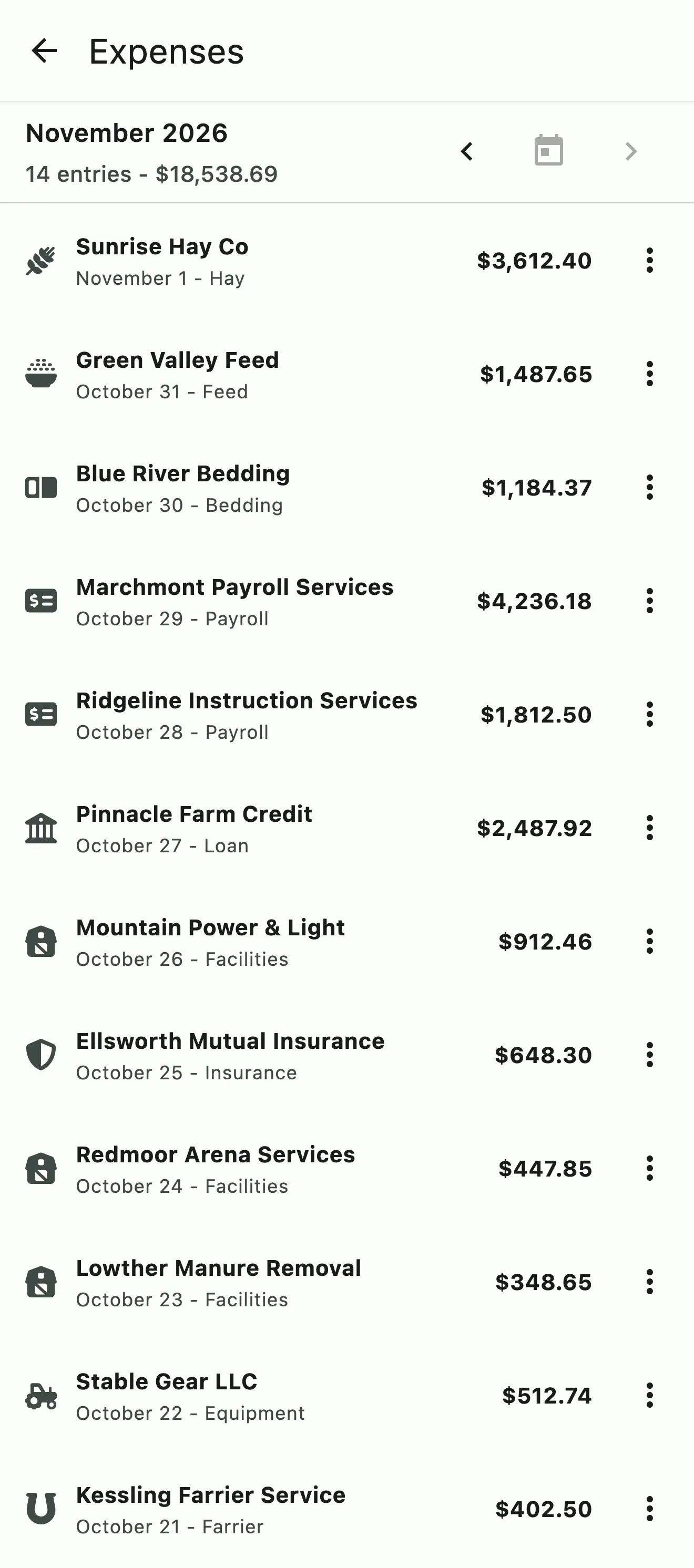
The month's expenses by vendor and category, with the month's total

How it works

Every cost, tied to what it was for

Every bill the barn pays is for something, whether it's hay for the loft, a vet visit for one horse, or new tires for the trailer. Log each expense against what it was for. If you paid it on a client's behalf, it's billed back to them as a reimbursement and never counts as income. Bills that come every month only need to be set up once.

The month's expenses by vendor and category, with the month's total

Capture and review

Log it when it happens

Enter an expense when the bill comes in and tie it to the horse or the equipment it was for. New entries wait in a review queue, so you can check them before they count, and every line exports to CSV.

  • Log expenses as they happen
  • Tie each one to a horse or piece of equipment
  • Every line in a CSV export

Coming Soon

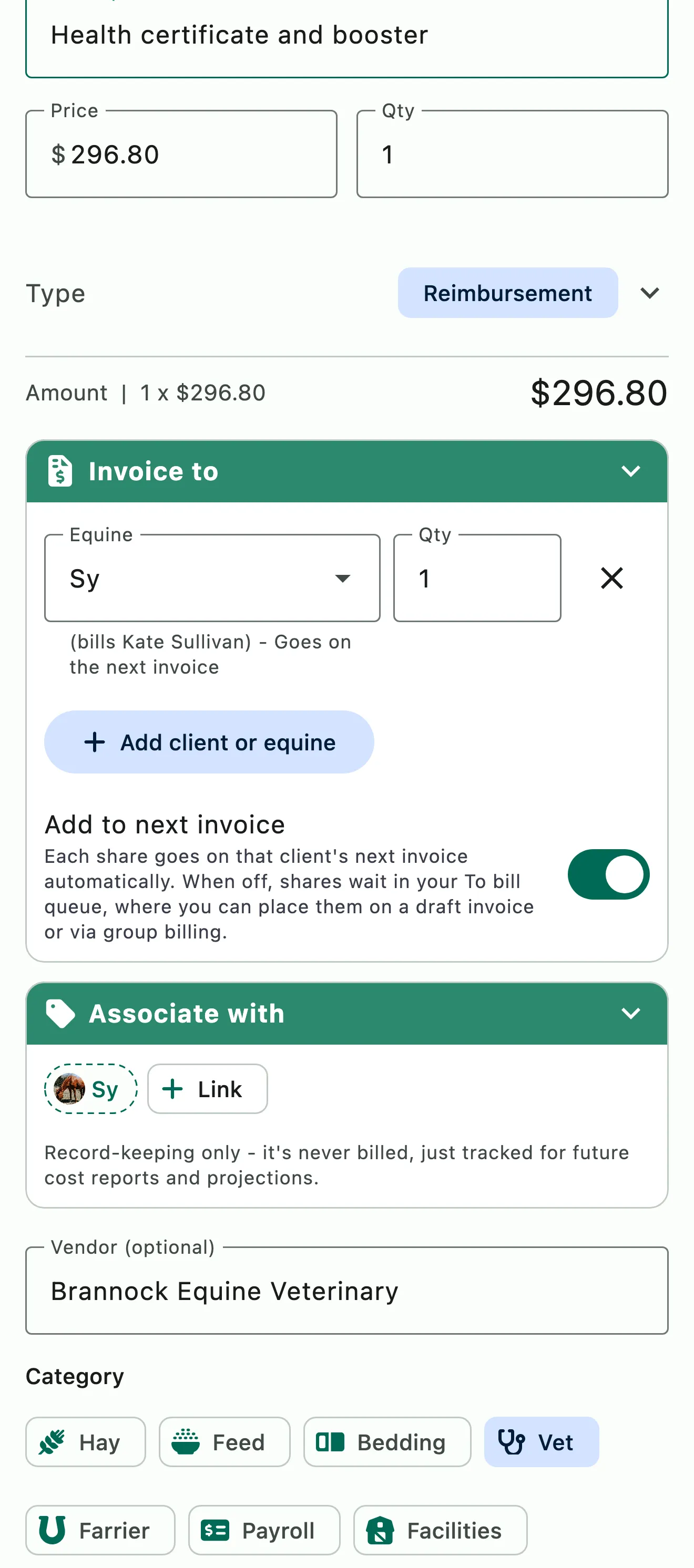
Coming soon: a vet expense marked as a reimbursement and invoiced to the horse, set to go on the client's next invoice

Pass-through billing

Paid on a client's behalf, billed back to them

Horse show fees, vet, or farrier bills you covered: add the charge to the client's invoice and mark it as a reimbursement. Or log the expense and invoice it to the client (coming soon), and it's added to their next invoice. Either way it's tracked as a reimbursement, so it never counts as income.

  • Mark any charge as a reimbursement on the invoice
  • Invoice an expense to the client from Expenses (coming soon)
  • Kept out of income in reports and exports
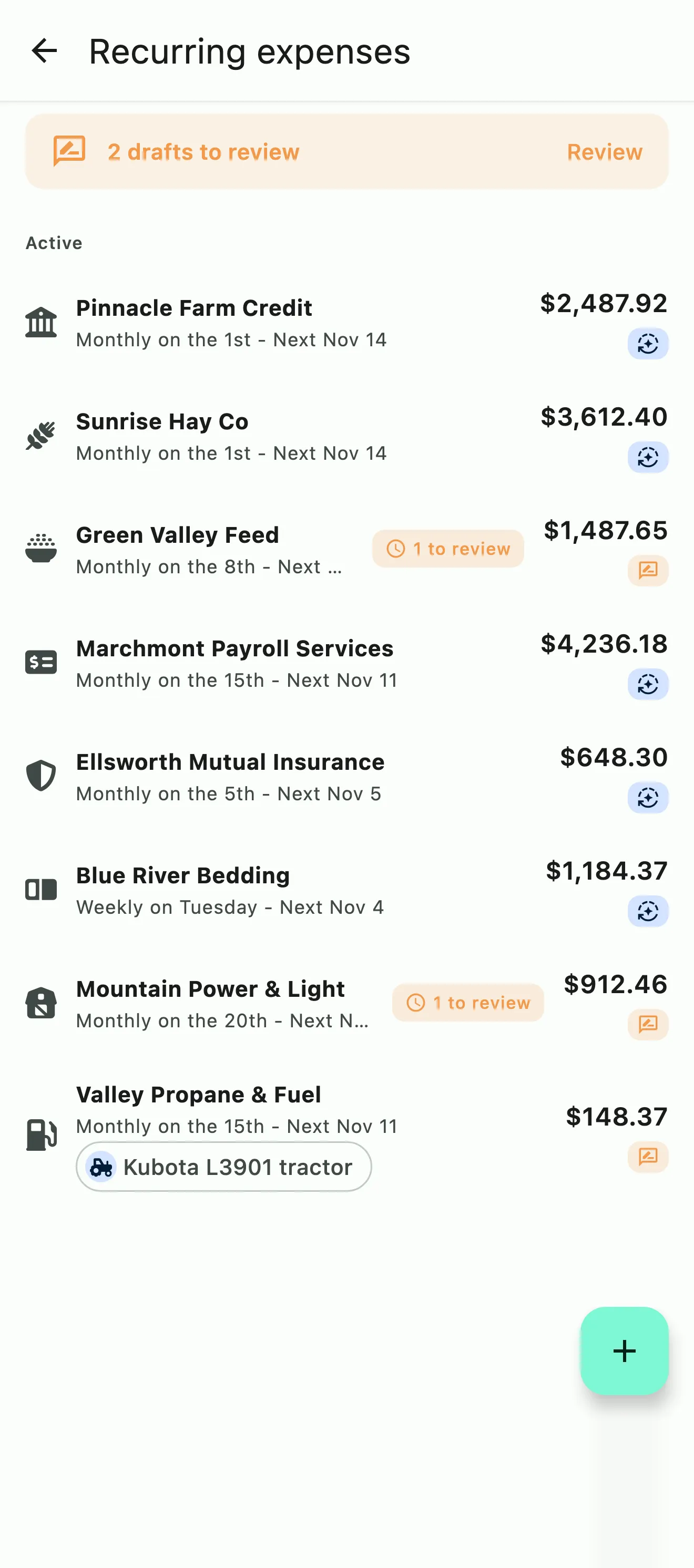
Recurring expenses with how often each repeats and when it's next due, and two drafts waiting for review

Recurring expenses

Set the monthly ones once

Hay, bedding, insurance, the farm lease: set a recurring expense once and HayNet logs it on its schedule, so the month's costs are complete without entering the same bills again.

  • Set recurring expenses once
  • Logged on their schedule
  • Included in your reports and exports
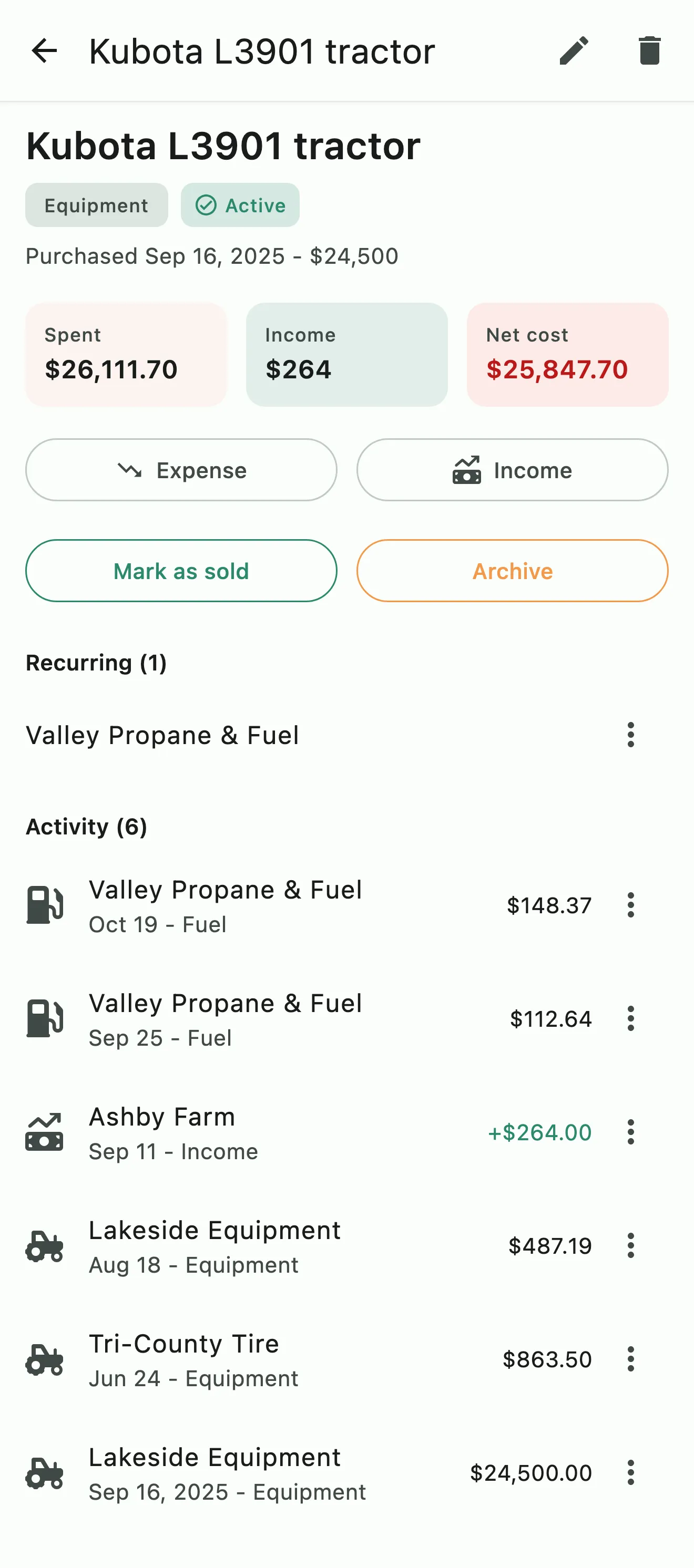
A tractor's asset record: purchase price, what it has cost and earned, and its fuel and equipment expenses

Asset management

What each horse, trailer and piece of equipment earns and costs

Track horses, trailers and equipment as assets, with the income and expenses linked to each one. See what an asset has earned against what it has cost over time, and mark it sold or archive it when it leaves the barn. When it's time to decide about a school horse or a second trailer, the numbers are already there.

  • Horses, trailers and equipment
  • Income and expenses linked to each asset
  • Mark sold or archive

Common questions

About expenses and assets

How do I bill a client for an expense I paid on their behalf?

Coming soon: log the expense in Manage › Finances › Expenses and, under Invoice to, pick the client or horse. Billing it to them tracks it as a reimbursement. With Add to next invoice on, each share goes on that client's next invoice automatically. With it off, the share waits in your To bill queue until you place it on a draft invoice or a group bill.

Or add it straight to the client's invoice as a line marked Reimbursement. Either way it's tracked as a reimbursement, so it never counts as income.

Can I set up recurring expenses?

Yes. Hay, bedding, insurance, the arena lease: set a recurring expense once under Manage › Finances › Recurring expenses and HayNet logs it on its schedule, so the month's costs are complete without entering the same bills again.

Each one can record automatically or wait as a draft for you to review, and you can skip the next one, pause it or end it.

How do recurring expenses work when the expense varies every month such as my utilities bills?

Set it to Draft for review instead of Auto-record. On each due date HayNet creates a draft with your usual amount. When the bill arrives, adjust the amount to match and record it.

Can I see what a horse or trailer earns and costs?

Yes. Asset management tracks horses, trailers and equipment as assets, with the income and expenses linked to each one, so you can see what an asset has earned against what it has cost over time. When one leaves the barn, mark it sold or archive it.

When it's time to decide about a school horse or a second trailer, the numbers are already there.

Can I export my expenses?

Yes. Every expense line exports to CSV: download the expenses report for any period under Manage › Finances › Reports. Recurring expenses are included as they're logged, and reimbursements stay out of income in your reports and exports.

See the full FAQ

See what your equipment and horses earn and cost.

No card required. Available on Apple iOS, Android and Web.